
56% of customers leave after a single bad customer support experience. Agents switching between ineffective and disconnected systems is a leading cause of that failure. Choosing the right call center solution for Teams helps businesses address this problem. (Coveo)
| TL;DR: 30 Seconds Quick Summary The Problem: Microsoft Teams wasn’t built for customer-facing operations, and businesses relying on it alone face disconnected tools, lost context, and frustrated agents. The Insight: The market is full of solutions that integrate with Teams but integration and truly native experience are two very different things. The Fix: Evaluate solutions across six key criteria, omnichannel support, intelligent routing, AI, CRM integration, supervisor visibility, and compliance before committing. Keep reading to: Understand how Teams-native contact centers work, compare integration types, and avoid common mistakes businesses make when choosing a solution. |
When a customer has to repeat the same issue across chat, email, and a phone call, it leaves a bad impression on the customer. This is what enterprise contact centers deal with every day as conversations spread across channels and teams struggle to keep context.
Many of these companies use Microsoft Teams for internal communication, which can handle messaging, meetings, and collaboration. But when it comes to customer conversations, things become challenging. Calls run on separate systems, agents switch tools, and lose context.
What you need is a Microsoft Teams based call center solution. This blog provides a complete guide to choosing a call center platform that works seamlessly with Microsoft Teams.
Why Microsoft Teams Alone Isn’t Enough for Customer Support
Teams is an excellent solution for internal communication. But call center operations have very different demands. It requires intelligent call routing, queue management, omnichannel messaging, CRM integration, real-time supervisor dashboards, compliance call recording, and more.
Without a dedicated call center solution integrated into Teams, businesses can face some of these problems:
- Agents switching between multiple platforms to handle calls, chats, and messages
- Supervisors don’t have real-time visibility into queues and agent performance
- IT teams spend time fixing integration issues after updates
- Compliance gaps because call data is stored in disconnected systems
However, the right Microsoft Teams call center integration eliminates these problems and turns Teams into a complete call center solution. This can help businesses save money and time on investing in a new tool.
What Are Call Center Solutions for Microsoft Teams and How Do They Work?
A call center for Microsoft Teams is not a separate system but an extension that turns Teams into a customer-facing communication platform.
It uses Microsoft Teams as the agent interface and adds the capabilities that customer support teams actually need, like intelligent call routing, queue management, real-time analytics, and automation.
How Call Center Solutions for Teams Work
Instead of switching between tools, agents can operate directly inside Teams. Here is how it works.
- Incoming conversations (calls, chats, emails) are routed through the contact center layer
- Agents handle everything within the Teams interface that they already use
- Supervisors track performance through live dashboards and reports
- Automation and AI assist with routing, responses, and summaries
Native Team Phone Integration vs. Third-Party Add-Ons
When evaluating call center solutions, the first and most important question to ask is: How does this actually connect with Microsoft Teams?
There are generally two types of solutions on the market:
| Aspect | Third-Party Platforms with Teams Connectors | Natively Built Teams Contact Center Solutions |
| Integration Approach | Adds Teams integration on top of an existing platform | Built directly within Microsoft Teams architecture |
| Agent Experience | Agents often switch between multiple interfaces | Agents work entirely inside Teams |
| Data Consistency | Data sync can become inconsistent across systems | Calls, messages, routing, and reporting stay unified |
| Licensing | Multiple licenses and integrations increase complexity | Simpler licensing within the Microsoft ecosystem |
| Updates and Reliability | Teams updates can disrupt integrations and workflows | Updates work smoothly with Teams changes |
| Workflow Efficiency | Context switching slows down support teams | Single interface improves productivity and visibility |
| IT Management | Requires ongoing maintenance across separate systems | Easier to manage within one environment |
Businesses already operating inside the Microsoft 365 ecosystem, a native Teams contact center integration offers strategic advantage. Your agents are already in Teams and your IT team manages the Microsoft environment. Your data stays within your existing Azure. It ensures minimal seamless adoption and minimal learning curve.
What Are the Factors to Consider When Choosing Call Center Solution for Microsoft Teams
Many platforms offer Teams integration, but only a few deliver a truly unified experience. Here are the core capabilities that separate a capable Teams Phone system from one that will create headaches six months down the road.
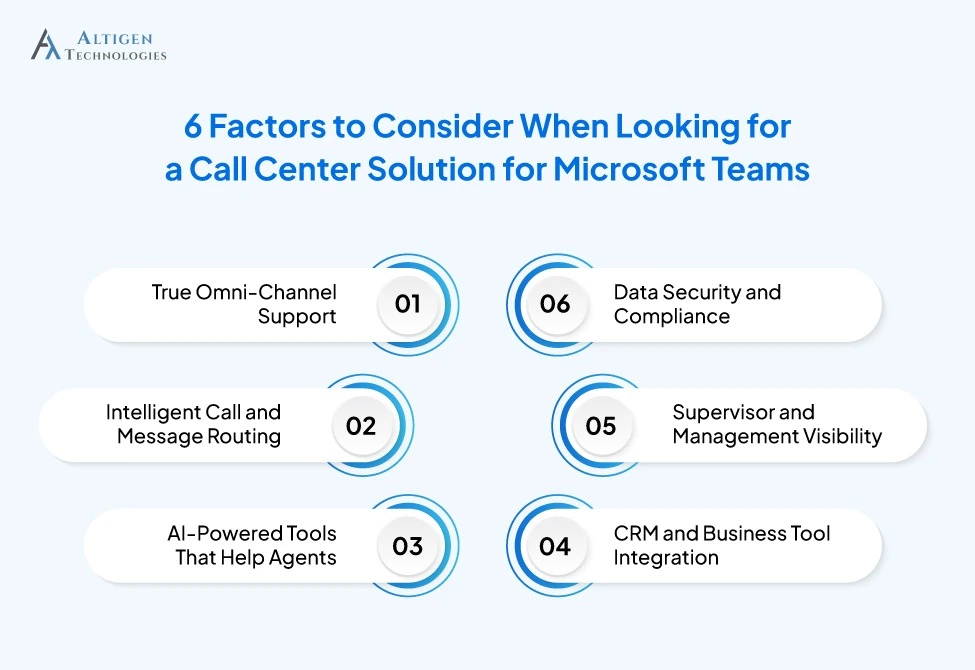
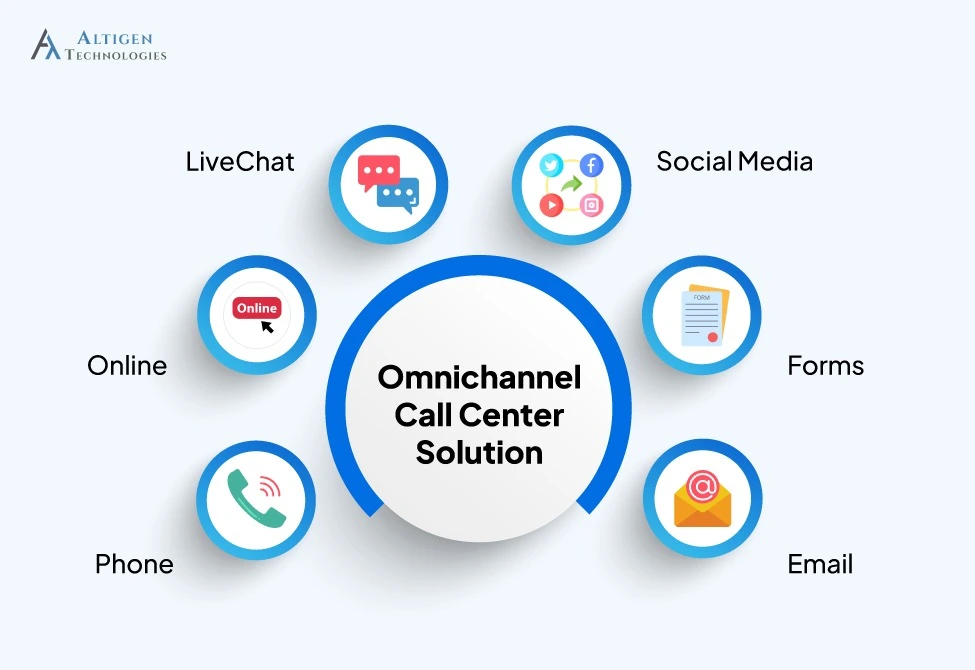
1. True OmniChannel Support
Phone calls are no longer the only way customers reach you. Today’s customers expect seamless support across voice, live chat, SMS, WhatsApp, and social media. According to a Salesforce report, 76% of customers expect consistent interactions across departments, but many businesses struggle to deliver it.
A Microsoft Teams call center handles all these channels from a single interface, with unified interaction history so agents aren’t asking customers to repeat themselves every time they switch channels.
2. Intelligent Call and Message Routing
Routing the right conversation to the right agent at the right time is a must for good customer experience. Look for solutions that offer skills-based routing, priority queuing, time-based rules, and the ability to create visual call flows without needing to write code.
Suggested Reading: How Altigen’s CoreEngage Extends AI Capabilities and Routing for Teams Phone
3. AI-Powered Tools That Help Agents
The most effective call center solutions now use AI to support agents in real time, not just automate simple tasks. A recent report shows over 80% of customer service organizations will apply generative AI to improve agent productivity and customer interactions. Here are the AI features you should look for:
- Real-time sentiment analysis so that supervisors can flag struggling interactions before they escalate
- AI-generated call summaries reducing the time agents spend on after-call work
- Real-time language translation for organizations serving multilingual customer bases
- AI chatbots for 24/7 support handling routine inquiries and redirecting complex issues to live agents
4. CRM and Business Tool Integration
When agents have to switch between multiple systems to find customer information, it impacts agent productivity and customer experience. That’s why you should evaluate integration depth when selecting a CRM tool. Look for solutions that offer:
- Pre-built integrations with major CRMs like Salesforce, HubSpot, Zoho, ServiceNow and more
- Open API frameworks for connecting custom business applications
- Unified interaction data so agents do not switch between multiple tools
- Customer history and better context for agents before every conversation
5. Supervisor and Management Visibility
Real-time visibility is a must for operations leads and contact center managers. You should be able to see live queue status, active calls, wait times, abandoned call rates, and agent performance from a single dashboard.
Look for capabilities like:
- Live queue status and active call monitoring
- Wait times and abandoned call tracking
- Real-time agent performance dashboards
- Historical reporting for trends and performance analysis
- CSAT and handle-time tracking
- Compliance recording and audit visibility
- Custom reports for operational and leadership teams
6. Data Security and Compliance
Data security and compliance are critical for IT managers and organizations in regulated industries. Your call center solution should meet the compliance and security standards to protect customer data and reduce regulatory risk. Choose a solution that supports regulations such as:
- HIPAA for healthcare organizations handling patient information
- PCI DSS for businesses processing financial data
- GDPR for organizations managing customer data from Europe
- ISO 27001 for information security and data protection
Common Mistakes Businesses Make When Choosing a Teams Contact Center
- Choosing a lower-cost solution without evaluating long-term operational and support costs.
- Selecting a platform that forces agents to switch between multiple interfaces.
- Ignoring omnichannel capabilities beyond voice calling.
- Overlooking how the solution handles Microsoft Teams updates and changes.
- Choosing a platform that requires heavy day-to-day IT management.
- Failing to verify CRM and business system integration capabilities.
- Ignoring compliance and data security requirements during evaluation.
- Choosing a solution that cannot scale with business growth and remote teams.
- Focusing only on features instead of agent and supervisor usability.
- Not reviewing the vendor’s onboarding, migration, and long-term support process.
Working with experienced technology consultants can help businesses avoid costly implementation and integration mistakes during deployment.
Final Takeaway
Businesses already using Microsoft Teams do not necessarily need another platform to manage customer conversations. A Teams-native contact center solution provides communication, reporting, and customer interactions in one environment, making operations easier for agents, managers, and IT teams.
CoreEngage by Altigen helps organizations manage voice, chat, SMS, reporting, and customer support directly inside Microsoft Teams without adding unnecessary complexity.
Book a Demo and see how your team can deliver better customer experiences without leaving Teams.
Frequently Asked Questions
A contact center solution for Microsoft Teams is an extension that turns Teams into a customer-facing communication platform by adding intelligent routing, omnichannel support, real-time analytics, and automation within the Teams interface.
Yes, but it has some limitations. Teams handle basic call queues and routing, but you need a dedicated contact center solution like CoreEngage to manage full-fledged call center operations.
A Teams contact center solution like CoreEngage includes intelligent call routing, omnichannel support, real-time dashboards, AI-powered agent assistance, CRM integrations, and compliance call recording.
A native solution is built within the Microsoft Teams architecture, so agents work inside Teams with unified data and workflows. A third-party integration connects an external platform to Teams that requires agents to switch between interfaces and creates data consistency issues.
Most enterprise-grade Teams contact center solutions offer pre-built integrations with Salesforce, Microsoft Dynamics, HubSpot, Zoho, and ServiceNow, along with open API frameworks for connecting custom business applications.