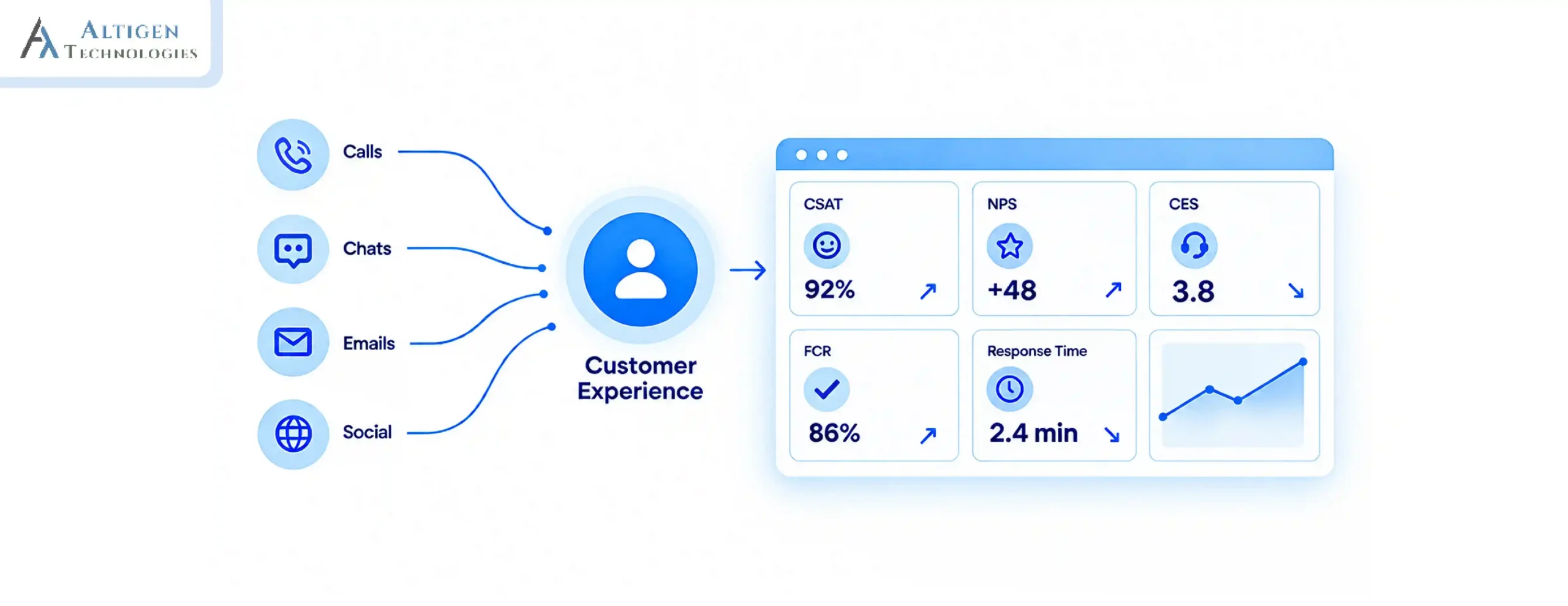
A contact center outage does more than interrup communication. It can create missed SLAs, frustrated customers, compliance challenges, and lost revenue. As organizations manage customer conversations across voice, chat, and digital channels, every insecure system creates another potential security and operational risk.
For contact center leaders, the challenge is not only keeping agents connected but also ensuring customer interactions remain secure, traceable, and available when the business needs them most.
With increasing focus on call center security and compliance, organizations should protect customers’ data and their privacy. A Microsoft Teams-native contact center solution can help reduce complexity, strengthen compliance, and keep customer communication within the environment teams already use.
| Quick Summary A secure contact center requires more than reliable communication. Organizations need strong security controls, complete audit trails, and simplified compliance management. A Microsoft Teams-native contact center approach helps reduce risks caused by disconnected tools while keeping customer interactions secure and accessible. |
Why contact center security is more important than ever
Contact centers handle sensitive customer information, including personal details, payment data, account information, and authentication details. As contact centers connect with cloud platforms, CRMs, AI tools, and third-party applications, protecting this information becomes increasingly important. Moreover, a security breach in a contact center can expose customer data, disrupt operations, and damage customer trust.
The 2026 Verizon Data Breach Investigations Report found that 31% of breaches start with software vulnerabilities, while 48% involve ransomware.
Contact center security is important because it helps businesses:
- Protect sensitive customer information from unauthorized access and data theft.
- Maintain customer trust by protecting personal, financial, and account information.
- Prevent fraud and account takeovers that can occur when customer data or authentication details are compromised.
- Avoid costly disruptions caused by security incidents, system compromises, or unauthorized activity.
- Meet regulatory and compliance requirements for handling sensitive customer and payment information.
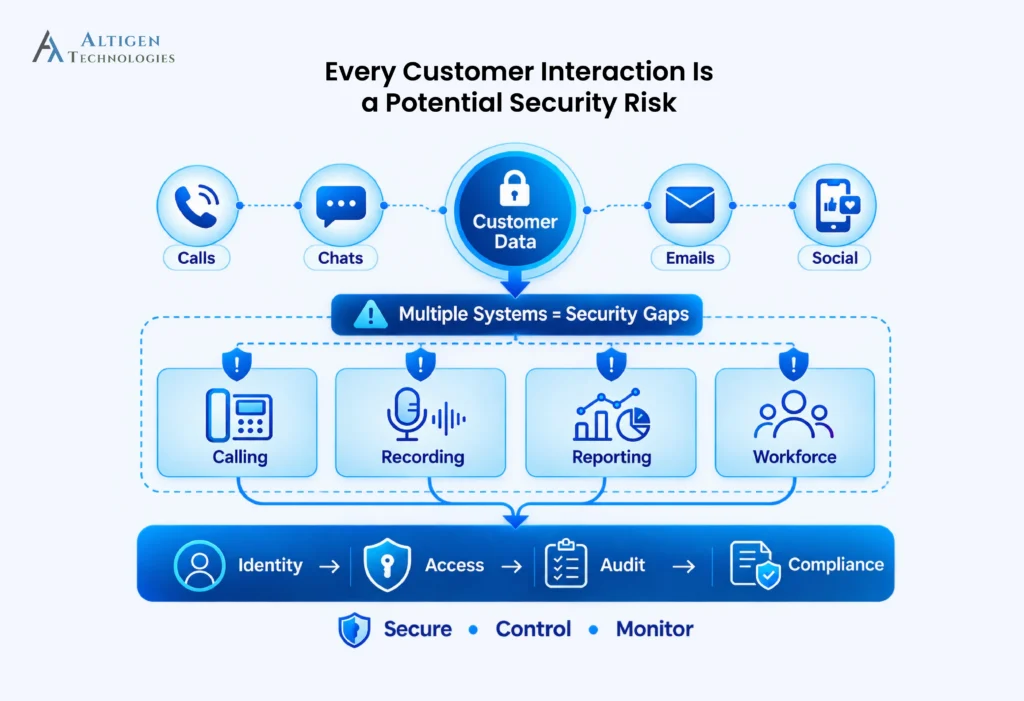
The hidden risks of using too many different tools
Historically, most businesses have added multiple solutions over time to meet business requirements. But today, every extra system can bring security and compliance exposure. Some of the challenges are:
- Multiple passwords and logins expand the attack surface and weaken identity protection. Every extra set of credentials increases risk.
- Shadow IT channels, like personal messaging apps, bypass governance. There is no record of the conversation or control over the data shared.
- Incomplete audit trails make it difficult to handle complaints, provide evidence, or pass regulatory checks. Missing records can delay investigations and weaken compliance.
A single weak link can cause downtime, disrupt service, and create uncertainty for customers. And when regulators or auditors ask for proof, gaps in data and reporting make the entire organization vulnerable.
How to identify contact center security risks before they impact the business
Many organizations do not discover contact center security gaps until an outage, audit, or compliance review exposes them. A simple risk assessment can help identify weak points before they impact customers.
Look for these warning signs:
Customer conversations exist across multiple platforms
If calls, chats, and messages are stored across disconnected tools, it becomes harder to control access, maintain complete records, and support contact center compliance requirements.
User access is managed separately
Independent login systems make it harder to enforce consistent security policies, remove inactive users, and control permissions across the organization.
Audit records require manual effort to collect
If teams need to search multiple systems to recreate customer interactions, compliance reporting becomes slower and increases the risk of missing information.
IT teams manage different security policies for different tools
Multiple platforms can create inconsistent configurations, making it harder to maintain security standards and apply updates effectively.
Identifying these risks early helps organizations improve security while maintaining uninterrupted customer service.
Why a Teams-native approach reduces security risks
A Teams-native contact center removes the weak spots that appear when customer contact is spread across different tools. Instead of managing multiple identity layers and separate audit trails, everything stays within the Microsoft 365 environment that organizations already use.
The benefits are visible in everyday operations:
- One identity, one policy, one platform: No more juggling different logins or enforcing parallel security rules.
- Built on Microsoft 365 security and compliance: The same Microsoft 365 security and compliance controls used for files, email, and collaboration can also protect calls, chats, and messages.
- Integrated security controls: Security tools such as Entra ID, Conditional Access, and Microsoft Defender can extend to customer interactions.
- No extra interfaces or apps: Agents keep working in Teams, which means less training, fewer mistakes, and faster adoption.
This approach keeps work familiar for employees and makes life easier for IT. Instead of switching between multiple dashboards and chasing down records in separate systems, everything is managed in a trusted environment.
Suggested Reading: Top Contact Center Software for Microsoft Teams
Compliance is becoming a boardroom priority
Regulators continue to raise the bar on data protection and accountability. Logs must be complete, incidents must be reported quickly, and boards carry responsibility for gaps.
These requirements are no longer confined to IT. They land directly on the boardroom agenda:
- Where is our customer data stored?
- Who has access to it, and under what conditions?
- Can we provide a full record of every call, chat, and message if a regulator or auditor asks?
An effective approach is to stay within the Microsoft ecosystem you already trust.
A Teams-native solution like Altigen CoreEngage builds compliance into daily operations. Audit trails are complete, and one security policy applies across every channel. Compliance becomes easier, errors are reduced, and the risk of disruption decreases.
Control and flexibility for IT managers
For IT managers, security is more than shutting doors. It is about setting the right rules, managing access across users, and knowing that policies are applied consistently. A Teams-native contact center makes that balance much easier.
Everything is managed in one place. Policies are set once and applied everywhere. At the same time, settings can be adjusted with the same tools IT already uses in Microsoft 365. Conditional Access, Single Sign-On, and Entra ID flow naturally into customer contact and can be tailored to match the organization’s exact requirements.
The benefits go beyond security. Deployment is faster because there are no parallel systems to configure. Lifecycle management is simpler because new users and roles are created inside the Microsoft environment that administrators already know. Onboarding new employees becomes simpler, while visibility across the contact center improves from day one.
For technical leaders, that combination of control and simplicity is hard to ignore. Security rules stay consistent, adjustments are easy to make, and the contact center compliance evolves in step with the rest of the Microsoft ecosystem. It gives IT leaders what they value most: control without complexity.
Suggested Reading: How to Evaluate Contact Center Software for Enterprises
What does it mean for your business?
When customer contact stays within Microsoft Teams, the benefits show in daily operations:
- Continuity is secured: Calls are answered, chats are logged, and SLAs are met even when volumes rise. Operations keep running without interruption.
- Compliance becomes simpler: Every interaction is stored with the right metadata, making audits faster to prepare for and easier to pass.
- Employees feel less stress: Service teams spend less time fixing errors, while IT no longer has to maintain parallel systems.
- Leadership has answers: Questions about risk, compliance, or data location can be answered with clear records instead of assumptions.
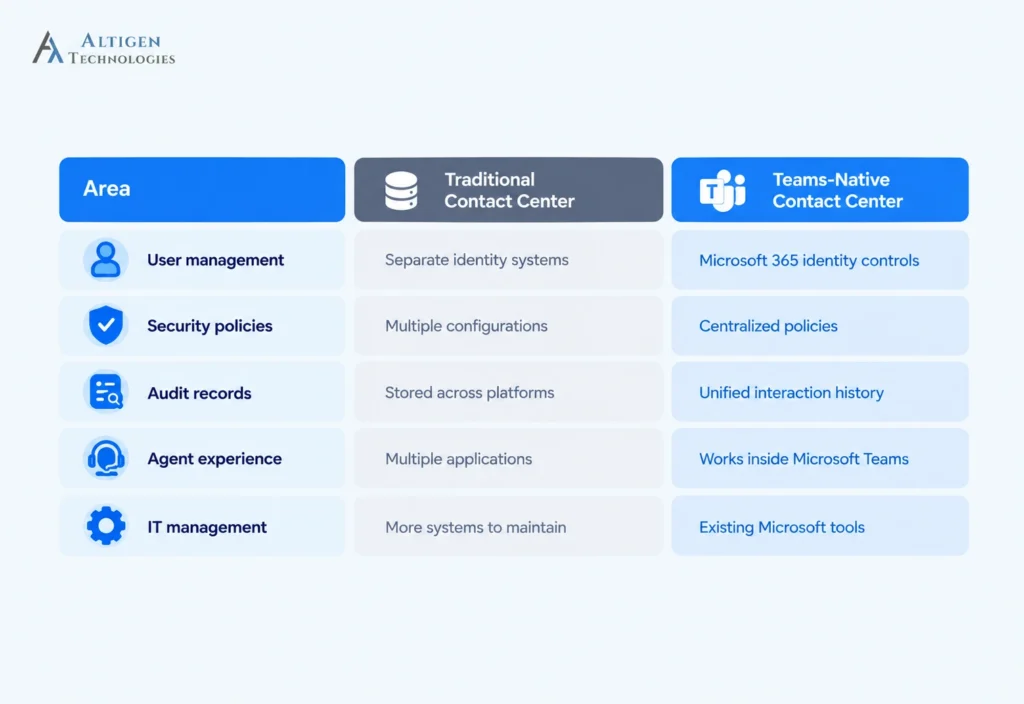
Traditional contact center vs Microsoft Teams contact center in terms of security
Here are the key security differences between a traditional contact center and a Microsoft Teams contact center.
How CoreEngage helps reduce contact center risks
CoreEngage extends the capabilities of Microsoft Teams and turns it into a secure contact center environment without adding unnecessary complexity. By keeping customer interactions within the Microsoft ecosystem, businesses can improve visibility, simplify management, and strengthen security controls.
With a Teams-native approach, organizations can:
- Maintain consistent security policies across customer communication channels.
- Improve audit readiness with better interaction tracking and reporting.
- Reduce the need for multiple disconnected contact center applications.
- Help agents work from a familiar Microsoft Teams interface.
- Support stronger compliance practices through centralized management.
For organizations looking to improve call center performance and contact center compliance, CoreEngage provides a practical way to strengthen customer communications while maintaining operational continuity.
Final takeaway
Customer communication is too important to depend on disconnected systems and inconsistent security controls. A Microsoft Teams-native contact center approach helps organizations bring calls, chats, compliance requirements, and security management into a familiar environment.
By reducing tool complexity and improving visibility across customer interactions, businesses can protect sensitive information, simplify contact center compliance, and keep service teams connected when customers need them most.
Ready to strengthen your contact center security and compliance? Talk to an expert to learn how a Microsoft Teams-native approach can help your organization build a more secure and reliable customer communication experience.
Frequently asked questions
Contact centers face security risks such as unauthorized access, fragmented communication systems, incomplete audit trails, and inconsistent security controls. These gaps can expose customer data, increase compliance risks, and make it harder to maintain contact center security.
Microsoft Teams provides a secure foundation for contact centers through Microsoft 365 identity management, access controls, and security capabilities, such as Entra ID, Conditional Access, and Microsoft Defender. A Teams-native contact center extends these protections to customer calls, chats, and interactions while supporting stronger compliance management.
Businesses can improve contact center compliance by controlling user access, maintaining complete interaction records, applying consistent security policies, and ensuring customer conversations are properly stored for audits and reporting.
A Teams-native contact center is a customer communication solution built directly within Microsoft Teams. It enables agents to manage calls, chats, and customer interactions from the same platform they use for collaboration, while maintaining Microsoft 365 security and management controls.
Contact centers should follow compliance standards based on their industry, location, and customer data requirements. Common areas include data protection, access control, call recording policies, audit trails, and privacy regulations such as GDPR, HIPAA, or PCI DSS where applicable.
A Teams-native contact center improves call center security by centralizing identity management, access controls, and communication data within Microsoft 365. This reduces security gaps caused by disconnected systems and helps organizations maintain better control over customer interactions.
Integrating a contact center with Microsoft Teams helps organizations simplify management, improve agent productivity, strengthen security controls, and maintain customer interactions within a familiar collaboration environment.