Two platforms. Similar names. Overlapping features. Many businesses are not sure whether they need UCaaS, CaaS or both. If you are comparing CCaaS vs UCaaS, the answer depends on how your employees communicate internally and how customers interact with the business.
The confusion is understandable. Both technologies are growing rapidly. The global CCaaS market was valued at $6.82 billion in 2025 and is projected to grow at a CAGR of 22.3%. Meanwhile, the UCaaS market hit $106.4 billion in 2025 and is growing at about 17.7% annually.
But both solve different business problems. Choosing the wrong solution means unnecessary costs and operational inefficiencies. This guide provides a detailed comparison between CCaaS and UCaaS, when to use each, and how they work together.
| TL;DR — 30-Second Takeaway CCaaS (contact center as a service): Cloud platform for managing customer-facing interactions: voice, chat, email, SMS, social UCaaS (unified communications as a service): Cloud platform for managing internal employee communication, voice, video meetings and messaging The real difference: The key difference is not features, but the business problems each platform solves. The business case: 43% of businesses already use the same vendor for both CCaaS and UCaaS because integration unlocks competitive advantage What this blog covers: Definitions, comparison table, decision framework, integration guide, provider criteria, FAQs |
What Is CCaaS (Contact Center as a Service)
Contact center as a service is a cloud-hosted platform that manages all external customer interactions from a single system without requiring any on-premises hardware.
It replaces traditional call center infrastructure with a scalable, subscription-based contact center cloud solution that supports omnichannel customer service.
Suggested Reading: Cloud Contact Center Solutions vs. Traditional PBX
The Core Capabilities of CCaaS
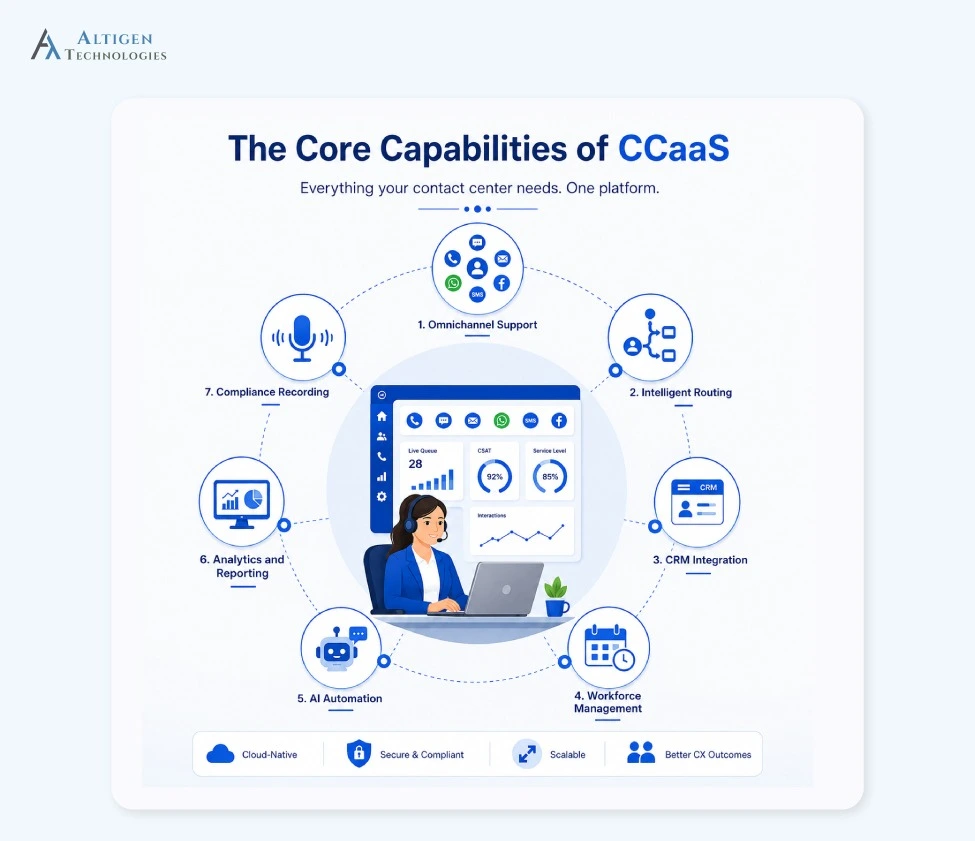
- Omnichannel support: Provide omnichannel support including voice, chat, email, SMS, and social media in one platform
- Intelligent routing: Skills-based, intent-based, and AI-assisted queue management
- CRM integration: Screen pop, auto-logging, and real-time customer context for agents
- Workforce management: Scheduling, adherence, forecasting, and quality monitoring
- AI automation: Voicebots, chatbots, agent assist, sentiment analysis, post-call summaries that help reduce handling time and improve efficiency
- Analytics and reporting: Real-time dashboards, SLA tracking, FCR, CSAT, and queue metrics
- Compliance recording: Full call recording, data residency controls, HIPAA/PCI-DSS support
Limitations of CaaS
- Not a phone system for your entire organization
- Not a collaboration tool for internal teams
- Not the same as VoIP or a cloud PBX
- Not a replacement for UCaaS in a work-from-anywhere environment
Who uses it: Contact center agents, supervisors, CX directors, and operations leaders.
What Is UCaaS (Unified Communications as a Service)
A Unified Communications as a Service (UCaaS) platform is a cloud-based solution that provides everyday employee communication and collaboration tools from a single system. Instead of managing separate applications for calling, messaging, meetings, and file sharing, teams can access everything through one unified communications platform.
It replaces on-premises PBX systems and other collaboration tools with a single, cloud-managed subscription.
Core Capabilities of UCaaS
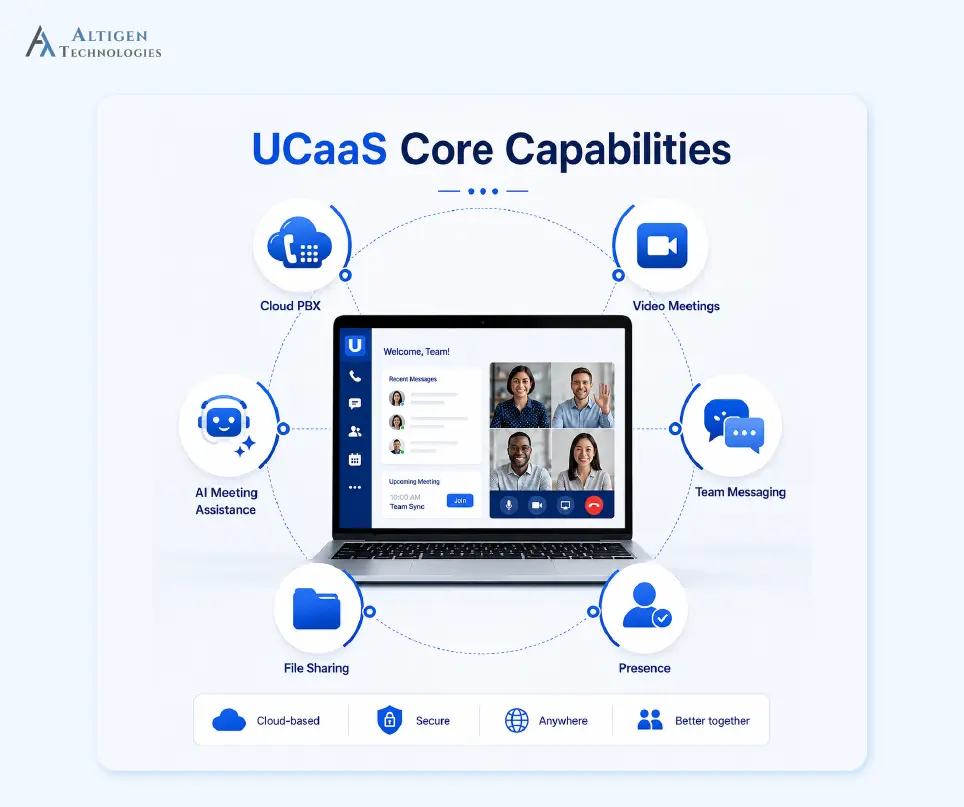
- Voice and telephony: Cloud PBX, call routing, voicemail
- Video conferencing: Meetings, webinars, virtual rooms
- Team messaging: Direct messages, group channels, threaded conversations
- Real-time availability: Real-time availability status across the organization
- File sharing and collaboration: Document co-editing, shared workspaces
- AI features: Meeting summaries, transcription, Copilot-style assistance
Limitations of UCaaS
- Not designed for high-volume customer interaction management
- Not equipped with omnichannel routing for customer-facing queues
- Not a replacement for workforce management, quality monitoring, or contact center analytics
- Not able to handle compliance recording at the contact center scale
Who uses it: All employees across the organization, including marketing, sales, HR, finance, IT, and operations.
CCaaS vs UCaaS: The Major Differences
The confusion between CCaaS vs UCaaS starts here: both support voice, both are cloud-delivered, and both use subscription pricing. But the similarities stop at the surface.
| Factor | CCaaS | UCaaS |
| Primary user | Contact center agents | All employees |
| Primary purpose | Customer engagement | Internal collaboration |
| Communication direction | Inbound + outbound customer interactions | Internal employee-to-employee |
| Channels supported | Voice, chat, email, SMS, WhatsApp, social | Voice, video, messaging, presence |
| Routing intelligence | Skills-based, AI-assisted, omnichannel queues | Basic call routing and presence |
| CRM integration | Deep: Screen pop, auto-logging, context sync | Limited or add-on |
| AI capabilities | Voicebots, agent assist, sentiment analysis, and real-time transcription | Meeting summaries, Copilot, transcription |
| Analytics | Customer journey, SLA, FCR, CSAT, queue metrics | Call logs and meeting analytics |
| Compliance recording | Full contact center-grade recording and QM | Basic call recording |
| Typical buyer | CX director, contact center manager | IT director, CIO |
| Cost model | Per-agent subscription | Per-seat subscription (all employees) |
CCaaS vs UCaaS: What Your Business Actually Needs
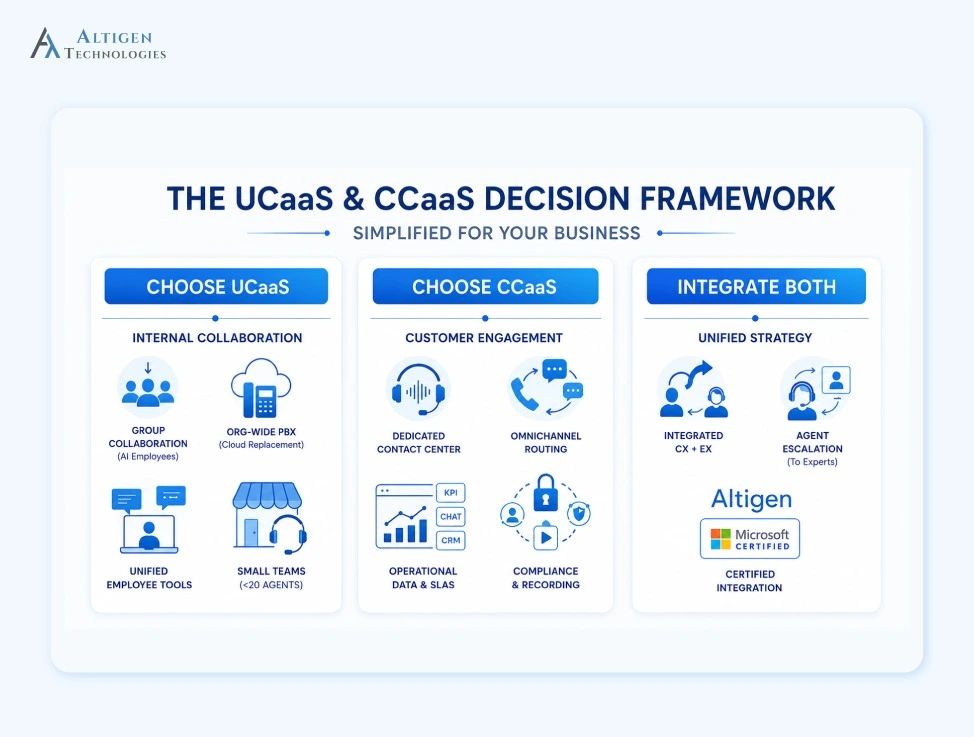
You need UCaaS if:
- Your goal is to improve internal collaboration for all employees
- You’re replacing a legacy PBX system organization-wide (not just the contact center)
- You need video conferencing, team messaging, and presence at an org level
- You have fewer than 20 agents and handle customer calls through a shared general line
- You’re in the early stages of cloud migration and haven’t yet addressed the contact center
You need CCaaS if:
- You run a dedicated contact center with agents handling customer interactions at volume
- You need omnichannel routing: voice, chat, email, SMS, social, in a single platform
- Customer SLAs, FCR, CSAT, and queue performance are key operational responsibilities
- You need real-time CRM data in front of agents during live interactions
- Your agents need AI assistance, suggestions, sentiment alerts, and post-call summaries
- You’re subject to compliance requirements like GDPR, HIPAA, and PCI-DSS, call recording.
You need both if:
- You have a contact center and a broader employee base communicating internally
- You want agents to escalate to back-office experts without leaving their platform
- You’re building toward a unified customer and employee experience strategy
- Your CCaaS provider offers a certified integration with your UCaaS platform
How CCaaS and UCaaS Work Together
Integrating CCaaS and UCaaS helps customer-facing teams collaborate more effectively with internal employees, helping companies resolve issues faster and deliver better customer experiences. That’s why 43% of businesses already use the same vendor for their contact center and UC platforms. Here is how CCaaS and UCaaS work together to improve customer and employee experiences.
- Faster escalation: An agent handling a complex billing query can see via UCaaS presence that a finance expert is available and get a real-time answer in seconds.
- Context preservation: Customer interaction data from CCaaS flows into the UCaaS collaboration thread, and supervisors see context without asking the agent to repeat it.
- One interface for agents: With Teams-certified CCaaS platforms using the Extend or Unify model, agents handle customer interactions in a tab inside Teams, with no context switching between applications.
- Supervisor visibility: Real-time dashboards span both platforms, giving CX leaders a complete view of agent activity and customer outcomes.
Customers who engage across multiple channels generate 30% higher lifetime value than those who use a single channel. Integrating CCaaS and UCaaS helps organizations deliver consistent customer experiences across channels.
The Microsoft Teams + CCaaS integration architecture:
- Teams serve as the UCaaS layer for all employees through voice, video, and messaging.
- Certified CCaaS platform serves as the contact center layer, routing, omnichannel, and workforce management
- Three integration models define how deeply they connect:
- Connect: Certified SBCs and Direct Routing: Maintains legacy telephony infrastructure
- Extend: Graph API integration: CCaaS runs as a tab app inside Teams, single agent UI
- Unify: Azure Communication Services-native: Deepest integration, AI-first, Copilot-ready
Final Takeaway
CCaaS and UCaaS serve different audiences, solve different problems, and operate at different layers of your communication stack. UCaaS serves your employees to keep internal collaboration smooth, scalable, and cloud-ready. CCaaS is designed for contact center operations.
Modern businesses are integrating both using UCaaS or CCaaS or both based on their requirements. If you are not sure whether you need a UCaaS environment or a CCaaS solution, Contact Altigen today. We will analyze your cloud communication requirements and offer the right solution.
Frequently Asked Questions
No, Microsoft Teams is a UCaaS platform. Teams Phone adds cloud calling, but it does not include intelligent routing, omnichannel channel management, CRM integration, workforce management, or contact center analytics. However, Altigen CoreEngage enhances the capability of Teams Phone to a complete contact center solution.
If you need a solution to handle internal communication, you need UCaaS. However, if you need a contact center solution, you need a CaaS solution.
Microsoft defines three integration models. Connect uses certified SBCs and Direct Routing, best for organizations with existing telephony investments. Extend uses the Graph API; the CCaaS platform runs as a tab in Teams for a single-agent UI. Unify uses Azure Communication Services natively, with the deepest integration, designed for AI-first deployments.
A traditional call center handles voice calls only, typically from a fixed location with on-premises hardware. A contact center cloud solution handles all communication channels voice, chat, email, SMS, and social, from a cloud-hosted platform accessible anywhere, with AI routing, CRM integration, and real-time analytics.
UCaaS pricing is typically per seat (all employees) at $10–$40/user/month, depending on the tier. CCaaS pricing is per agent at $50–$200+/agent/month depending on channels, AI features, and workforce management capabilities. Most businesses pay for both; UCaaS covers all employees, CCaaS covers agents only.