A finance team budgets $10 per user for Teams Phone. Then the first invoice arrives at nearly $30.
Where did the extra $20 come from?
It is not necessarily a hidden fee or a bad deal. Teams Phone is only one part of the phone system. The license adds business calling features to Microsoft Teams, but you still need a separate connection to the public telephone network to make and receive external calls.
That connection can come through Microsoft Calling Plans, Operator Connect, Teams Phone Mobile, or Direct Routing, depending on your users, carrier, and infrastructure.
In this blog, we explain the key factors to consider before choosing Microsoft Teams Phone plans and help you determine which option is right for your organization.
| TL;DR – Quick takeaway 1. Teams Phone is a license, not the entire phone service. You also need a PSTN connectivity option for external calling. 2. Microsoft Calling Plans are a good fit when Microsoft is available as your carrier and your requirements fit its calling plans. 3. Operator Connect is useful when you want PSTN service from a participating carrier without managing an SBC yourself. 4. Direct Routing is a better option when you need to connect legacy PBXs, analog devices, existing carriers, or regional systems that other options don’t support. |
What are the factors to consider before choosing Microsoft Teams calling plans
Before choosing a Microsoft Teams Phone plan, you need to understand some key factors to avoid unnecessary costs.
1. Teams Phone requires a separate license
This is the part that catches most buyers. Microsoft unbundled Teams from its enterprise suites. The change hit the European Economic Area and Switzerland in October 2023 and the rest of the world in April 2024.
For new Enterprise customers, Microsoft separates the Teams service from the core E1, E3, and E5 suites. Depending on the plan and calling requirements, you may then need Teams Phone licensing and a PSTN connectivity option.
Existing customers may continue using their current licensing arrangement under Microsoft’s applicable terms. Check your tenant’s current licensing status before modeling the cost of adding Teams Phone.
| Your situation | What you need to buy |
| New enterprise customer | E1, E3, or E5 without Teams + a standalone Teams license; Teams Phone licensing if users need business calling |
| Enterprise customer from before April 2024 | Existing suite can continue, with Teams Phone added where required |
| Microsoft 365 Business, up to 300 users | Business suite with Teams + Teams Phone licensing if users need business calling |
| Frontline workforce | F1 or F3 + Teams Phone Standard for Frontline Workers where required |
2. Teams Phone and PSTN connectivity are separate
The connectivity model you choose also determines who manages carriers, phone numbers, routing, and related infrastructure. That can affect both administration effort and the work required during migration.
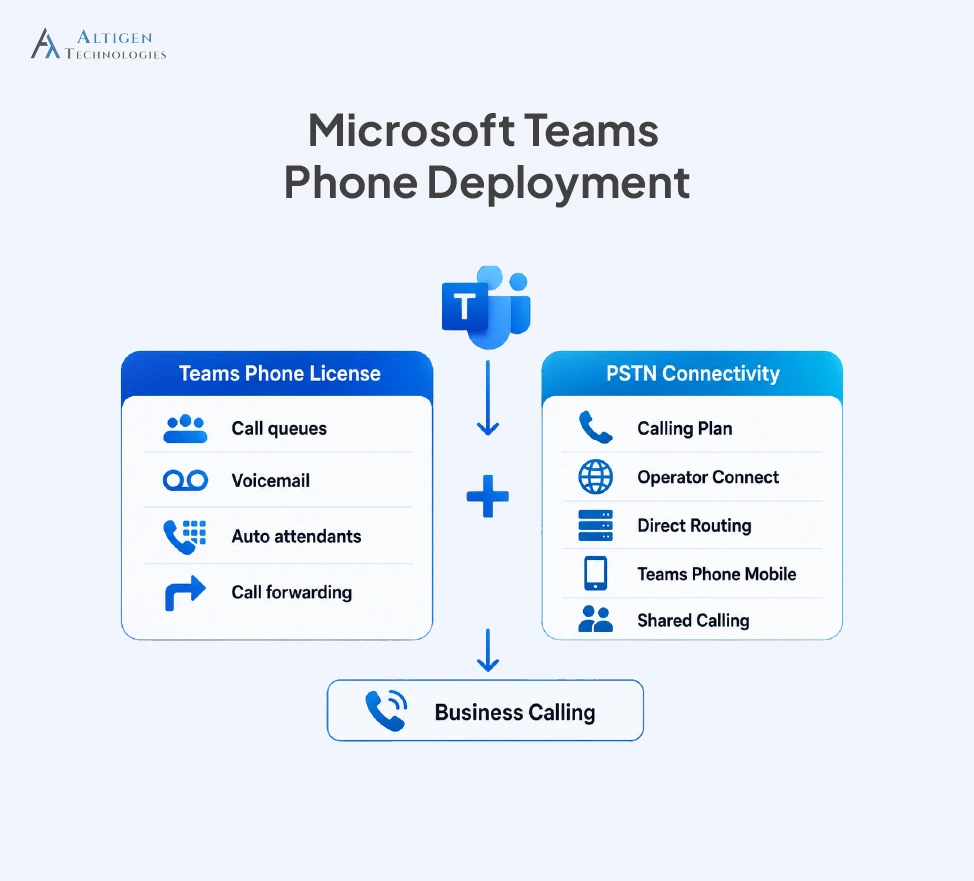
The Teams Phone license adds Microsoft Teams Phone features for business calling, including:
- Cloud voicemail
- Auto attendants
- Call queues
- Call forwarding and transfer
- Caller ID
The important point for buyers is that Teams Phone alone does not connect users to external phone numbers. These features help manage business calls, but they don’t let users make or receive calls from external phone numbers.
PSTN connectivity is the other part of the setup. This connects Teams Phone to the public telephone network, allowing users to call mobile phones, landlines, and customers outside your organization. This means the Teams Phone license is only part of the calling cost.
3. Four ways to connect to the PSTN
Microsoft documents four PSTN connectivity models for Teams Phone: Microsoft Calling Plans, Operator Connect, Teams Phone Mobile, and Direct Routing. Shared Calling is a separate capability for users with limited external calling needs.
| Option | How it works | Best fit |
| Microsoft Calling Plans | Microsoft is your carrier | Small teams, one country |
| Operator Connect | Your carrier links through Teams admin center | Most mid-sized and multi-country teams |
| Teams Phone Mobile | Mobile number is integrated with Teams | Field and mobile-first employees |
| Direct Routing | A certified SBC connects your carrier to Teams | Legacy PBX, analog devices, existing carrier |
For users with limited calling needs, Shared Calling can be an alternative to assigning each user a dedicated number and calling plan. It uses a resource account and shared phone number for external calls.
Organizations can also combine connectivity options, such as Operator Connect at headquarters and Direct Routing in a region with specific carrier requirements. For instance, a multinational manufacturer may use Operator Connect where its carrier is supported and Direct Routing where an existing PBX is still required.
This flexibility is important when choosing a Teams Phone solution that can support different connectivity and deployment requirements.
4. Audio conferencing is different from Teams Phone
Audio Conferencing and Teams Phone serve different purposes. Audio Conferencing lets people join Teams meetings by phone, while Teams Phone provides business calling to and from phone numbers. They are separate licenses for different use cases, so you can purchase either one based on what your users need.
Here’s how the licensing works:
- E5 includes Audio Conferencing.
- E1 and E3 users need Audio Conferencing separately.
- New E1, E3, and E5 customers do not get Teams Phone included by default.
For example, an E3 user who only needs to join meetings by phone may need Audio Conferencing but not Teams Phone. A sales employee who makes external business calls needs Teams Phone and PSTN connectivity.
5. Different user types need different plans
License requirements vary by role, device, and calling needs. Match the license to how each user actually works to avoid paying for features they don’t need.
| User type | What they actually need | License |
| Desk-based knowledge worker | Full calling, voicemail, transfer | Teams Phone Standard plus connectivity |
| Frontline or shared-device worker | Basic reliable calling | Teams Phone Standard for Frontline Workers |
| Common area endpoint | Lobby phone, warehouse line | Microsoft Teams Shared Space |
| Customer-facing agent | Advanced routing, recording, supervisor tools | Teams Phone + certified contact center |
Frontline licensing has specific eligibility requirements. A qualifying user must use a primary device with a single screen smaller than 10.9 inches or share a primary work device with other frontline-licensed users. Microsoft Teams Shared Space, previously called Microsoft Teams Shared Devices, is intended for common-area phones and shared devices.
For example, a warehouse employee using a shared device may qualify for a frontline license, while a receptionist using a dedicated office PC would typically need standard Teams Phone licensing.
6. The license price is not the total cost
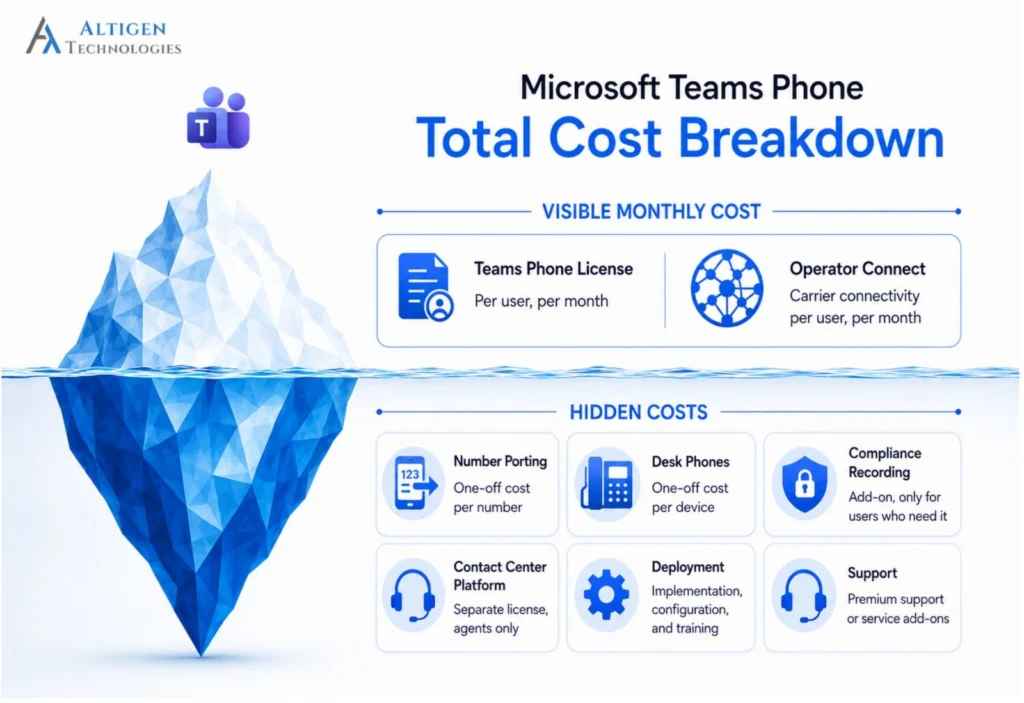
Microsoft Teams Phone pricing is not limited to the per-user license. PSTN connectivity, number porting, devices, recording, and contact center software can add to the first-year cost.
| Line item | Shape of the cost |
| Base Teams or Microsoft 365 license | Per user, monthly, already in your budget |
| Teams Phone Standard | Around $10 per user per month |
| Operator Connect carrier contract | Carrier-priced |
| Number porting | One-off per number |
| Certified desk phones | One-off, roughly $150 to $400 per device |
| Compliance call recording | Add-on, where required |
| Contact center platform | Separate license, where required |
7. Compliance and emergency calling can affect your choice
Your licensing choice can also depend on compliance, emergency calling, and data residency requirements. These requirements can limit which connectivity options you can use and increase the risk of choosing a setup that does not meet regulatory or emergency-calling obligations.
- Emergency calling: In the US, Kari’s Law requires direct 911 dialing and central notification, while the RAY BAUM’S Act requires a dispatchable location to be provided with 911 calls, according to FCC requirements.
- Call recording: Standard Teams recording may not meet compliance requirements. Businesses that need guaranteed capture, encryption, or long-term retention may need a third-party compliance recording solution.
- Data residency: Regulated businesses may need call and recording data stored in specific regions. Confirm the data location and encryption key ownership before choosing a provider.
Which Microsoft Teams voice plan is the right fit for your organization
The right Microsoft Teams Phone plan depends on your organization’s size, locations, existing phone infrastructure, and calling requirements. Here’s a quick guide to help you choose.
1. Small team, single country, no legacy phone system
Businesses in a single country with no legacy phone system can consider Teams Phone with Microsoft Calling Plans when Calling Plans are available in their region. Microsoft provides the PSTN connection, so you can manage the phone service without coordinating a separate carrier.
The Teams Phone with Calling Plan bundle is a good option when you want one provider for both the Teams Phone license and PSTN service. You manage the phone service through Microsoft rather than coordinating a separate carrier.
2. Mid-sized team and multinational companies
Teams Phone Standard combined with Operator Connect can be the right option when you want to continue with a participating carrier for PSTN connectivity. Your operator manages the PSTN service and SBC infrastructure, while phone numbers can be managed through the Teams admin center. This avoids the hardware and management requirements associated with running your own SBC.
3. Direct routing for legacy systems
Direct Routing is a good fit when you need to connect Teams Phone with a legacy PBX, analog devices, or existing telephony infrastructure. It requires a certified SBC, so organizations often work with a Teams Phone provider like Altigen that can handle the carrier connection, deployment, and ongoing management.
For example, a manufacturer with analog paging systems and an existing PBX may use Direct Routing to connect those systems while moving employee calling to Teams.
4. Large frontline or shared-device workforce
You need to use different licenses based on how employees use Teams: frontline licenses for shift workers, Teams Shared Space for common area endpoints, and full Teams Phone Standard only for desk-based staff.
Using the appropriate license for each user type can prevent you from paying for capabilities that some employees do not need.
5. Customer-facing agents
Teams Phone can handle business calling, but customer-facing teams with advanced routing, compliance recording, and supervisor tools may need a certified Teams contact center solution.
Final takeaway
Microsoft Teams Phone gives businesses several deployment options. But there isn’t a single Microsoft Teams Phone plan that’s right for every business. The best choice depends on how your employees work, where they’re located, how they connect to customers, and the level of control and compliance your organization requires.
Choosing the right Teams Phone setup depends on your users, locations, existing carrier, and calling requirements. Altigen can help you evaluate the licensing and connectivity options and build a deployment around your existing infrastructure. Contact our experts to discuss your requirements.
Frequently asked questions
No, Teams Phone is a separate add-on license. E3 and E5 suites that bundled Teams are no longer sold to new customers, so most new buyers need a suite without Teams, a Teams standalone license, and Teams Phone Standard on top.
Teams Phone Standard sits around $10 per user per month, with bundled calling plans reaching roughly $34 depending on included minutes. Add your base Teams license underneath and carrier costs alongside, and most organizations land nearer $25 to $35 all in.
Operator Connect is best when you want carrier connectivity without managing your own SBC. You should choose Direct Routing if you need to connect legacy systems, analog devices, or operate in countries that Operator Connect does not cover. Direct Routing requires a session border controller and someone to run it.
Teams Phone provides business calling features in Teams. A Calling Plan provides PSTN connectivity through Microsoft, allowing users to make and receive external calls.
Yes, you can generally port existing numbers to Teams Phone. The process depends on your PSTN provider and connectivity option. Start early because account-detail mismatches can delay porting. Confirm porting requirements with your carrier before migration.
Yes. Direct Routing can connect Teams Phone to an existing PBX, analog devices, or other telephony infrastructure through a certified session border controller.
No. They are separate licenses serving different purposes. Audio Conferencing lets people dial into meetings by phone. Teams Phone handles business calling. E5 includes Audio Conferencing, while E1 and E3 do not, and none of them include Teams Phone for new customers.
Shared Calling lets a group of users make and receive external calls through a phone number attached to an auto attendant resource account. It removes the need for individual numbers and calling plans, which can reduce costs for staff who rarely make external calls.
You should consider PSTN coverage, carrier options, existing infrastructure, number porting, emergency calling, compliance requirements, support, deployment responsibilities, and ongoing administration. The right provider should reduce migration effort and operational risk rather than simply provide PSTN connectivity.