Your agents already work in Microsoft Teams. But adding a contact center to Teams does not guarantee the same agent experience, routing capabilities, or operating cost.
Some platforms run alongside Teams, while others bring contact center capabilities directly into the Teams interface. That architectural difference affects how agents handle calls, access customer context, manage transfers, and work across channels.
That’s why finding the right contact center software for Microsoft Teams can be challenging. Many vendors promise seamless integration, but they differ significantly in how they handle routing, reporting, AI, and the day-to-day agent experience.
This guide covers the top 7 contact center platforms for Microsoft Teams in 2026. You will see how each one connects, what it costs, and who it suits.
| TL;DR – A Quick Takeaway 1. Altigen CoreEngage is a strong fit for organizations that want a native Teams experience with AI and omnichannel capabilities. 2. AnywhereNow, ComputerTalk, and Luware Nimbus suit organizations with more complex routing and deployment requirements. 3. Landis, Five9, and NICE CXone target different needs, from simpler SMB deployments to outbound sales and advanced workforce management. 4. Compare different integration models including Connect, Extend, and Unify and check factors like AI, routing, security, scalability, and CRM capabilities before choosing. |
What are the top 7 contact center software for Microsoft Teams <H2>
Microsoft runs a formal certification program for contact center vendors. We have shortlisted the top 7 Microsoft Teams contact center software on Teams integration, routing capabilities, AI functionality, omnichannel support, scalability, CRM integration, pricing transparency, and deployment fit.
| Platform | Best for | Starting Price | Teams integration model |
| Altigen CoreEngage | Organizations that want AI-powered Teams contact center solution at competitive pricing | Quote-based | Extend and Unify |
| AnywhereNow | Large enterprises with intricate routing logic | Quote-based | Connect and Extend |
| ComputerTalk ice Contact Center | Businesses that want maximum deployment flexibility | Quote-based | Connect, Extend, and Unify |
| Luware Nimbus | Organizations that need advanced routing | Modular per user licensing, quote-based | Extend |
| Landis Contact Center | Small and mid-sized businesses looking for simple Teams contact center solution | Per user monthly, published on request | Extend and Unify |
| Five9 | Sales-heavy and collections-focused contact centers | $119 per user per month | Connect |
| NICE CXone | Enterprises that need deeper workforce and analytics capabilities | $110 per agent per month | Connect |
1. Altigen CoreEngage
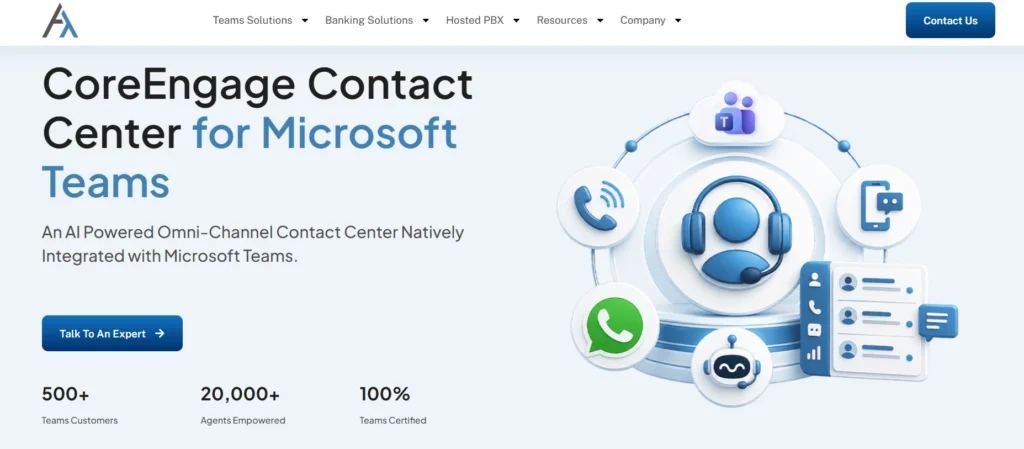
Overview: CoreEngage is an AI-powered omnichannel contact center built to run natively inside Microsoft Teams. Agents, supervisors, and admins all work from the Teams app. Nothing runs in a bolt-on window.
Best for: Microsoft-first organizations that want contact center depth without leaving the Microsoft 365 environment they already manage.
Key features:
- AI conversation intelligence
- Omnichannel customer service support
- Compliance call recording
- Real-time supervisor dashboards
- CRM screen pop integration
- Microsoft Entra ID provisioning
Teams integration model: Extend and Unify
Pricing. Quote-based, with both consumption and fixed per-user models.
Why choose it. Altigen reports customer outcomes including up to 15 percent increase in first call resolution and up to 30 percent reduction in cost per contact. It carries ISO 27001, GDPR, and SOC 2 alignment. Altigen already served more than 1,500 organizations including banks.
Suggested Reading: How to Build an AI-Powered Contact Center on Microsoft Teams
2. AnywhereNow (formerly Anywhere365)
Overview. AnywhereNow provides an enterprise contact center solution for Microsoft Teams, with skill-based routing, omnichannel support, and AI-powered automation to help large organizations manage complex customer service operations.
Best for: Large enterprises with intricate routing logic and multi-region operations.
Key features.
- Dialogue-based routing engine
- Deep Teams presence sync
- WhatsApp and social channels
- Workforce management add-ons
Teams integration model: Certified for both Connect and Extend
Pricing. Quote-based
3. ComputerTalk ice Contact Center
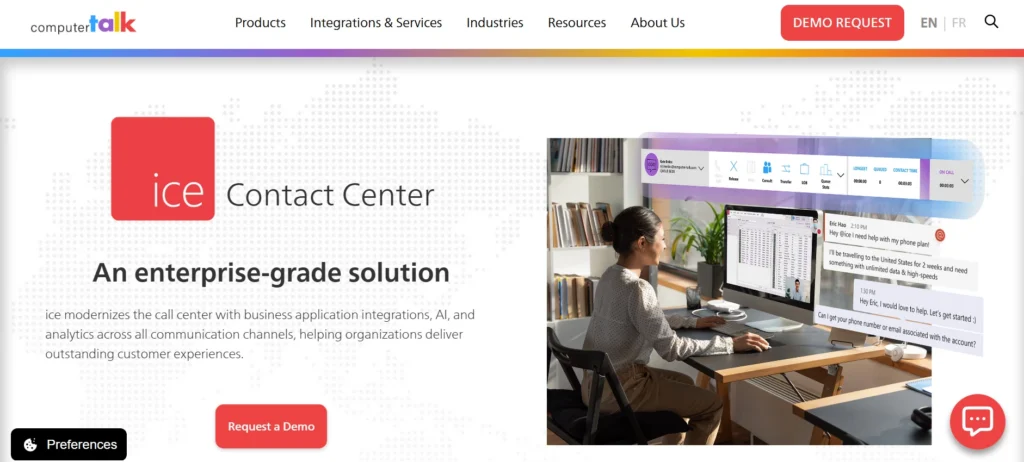
Overview. ComputerTalk ice is one of Microsoft’s first partners to complete the Connected Contact Center certification program. It is certified across all three Microsoft Teams integration models: Connect, Extend, and Unify.
Best for: Businesses that want maximum deployment flexibility
Key features:
- Omnichannel queueing and IVR
- Built-in reporting suite
- Healthcare and public sector templates
- Optional on-premises deployment
Teams integration model: Certified across all three Microsoft Teams integration models: Connect, Extend, and Unify.
Pricing. Quote-based
4. Luware Nimbus
Overview: An AI-powered customer experience and contact center platform that turns Microsoft Teams into a unified platform for customer service, reception, and back-office operations.
Best for: Organizations that need advanced routing and workflow capabilities within Microsoft Teams.
Key features:
- Skill-based routing
- Modular task assignment
- Power BI reporting hooks
- Attendant console option
Teams integration model: Extend
Pricing. Modular per user licensing, quote based
5. Landis Contact Center
Overview. A US-based contact center solution for Microsoft Teams which was a launch partner for Microsoft’s Unify integration model and became one of the first contact centers globally to achieve Unify certification.
Best for: Small and mid-sized businesses moving off legacy PBX systems that want a simple platform at competitive pricing
Key features:
- Straightforward queue setup
- Teams-native agent app
- Attendant console included
- Fast deployment timelines
Teams integration model: Extend and Unify
Pricing. Per user monthly, published on request.
6. Five9
Overview. With AI-powered solutions that integrate seamlessly with Microsoft Teams, Five9 helps organizations deliver personalized customer experiences across contact center interactions. Its platform provides AI capabilities, outbound dialing, digital engagement, and agent assistance for high-volume customer service operations.
Best for. Sales-heavy and collections-focused contact centers
Key features:
- Predictive and power dialing
- Intelligent virtual agents
- Agent assist tooling
- Mature CRM connectors
Teams integration model: Connect
Pricing. Entry tiers start near $119 per user per month, with a 50 seat minimum.
7. NICE CXone
Overview. This customer experience platform, integrated AI, workforce engagement, analytics, automation, and omnichannel customer interactions. Its Enlighten AI capabilities extend across agent assistance, quality management, workforce management, and customer experience analytics
Best for. Organizations that need deep workforce engagement, quality management, analytics, and AI capabilities alongside their contact center
Key features:
- AI quality management
- Workforce optimisation depth
- Interaction analytics
- Extensive compliance controls
Teams integration model: Connect.
Pricing. Quote-based, commonly cited from around $110 per agent per month.
What are the key factors to consider when selecting a Teams contact center software
The key factors to consider when selecting Teams contact center software include Teams integration, AI capabilities, routing flexibility, omnichannel support, security, scalability, and CRM integration.
1. Teams integration model
Microsoft Teams contact-center integrations use different models, and they can create very different agent experiences.
- Connect: Contact center runs separately from Teams
- Extend: Contact-center features run within Teams
- Unify: Contact-center and Teams capabilities work as one experience
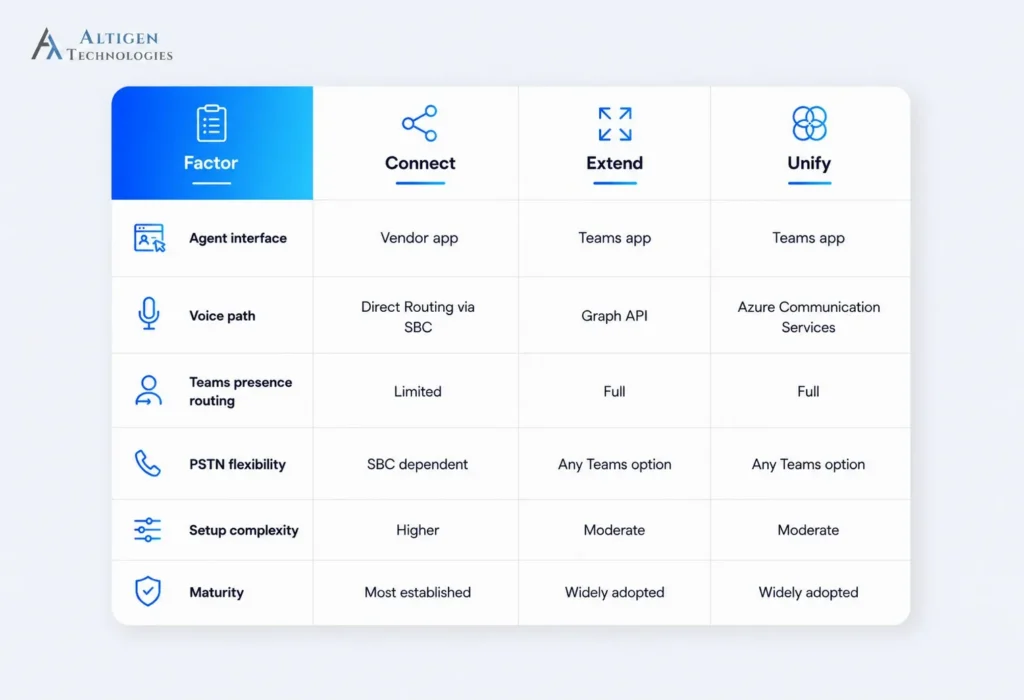
Ask which integration model the vendor uses and whether Teams remains the primary interface or agents work primarily in a separate contact-center application.
Then test the actual workflow. If agents need to switch between applications during live calls, find out how that affects transfers, presence, customer context, and everyday call handling.
For example, an IT leader at a mid-sized financial services company migrating from a legacy contact center should test whether agents can handle calls, transfers, presence, and customer context without switching between Teams and another application.
If the workflow depends on a separate contact center interface, the organization should factor that additional agent complexity into its migration decision.
2. AI capabilities
AI capabilities can reduce repetitive tasks and give supervisors faster visibility into interaction quality. For example, agent assistance can display relevant information during an interaction, conversation summaries can reduce post-call documentation, and interaction analytics can help supervisors identify recurring issues across large volumes of conversations.
When evaluating AI capabilities, look for:
- Agent assistance: Gives agents relevant information during customer interactions.
- Task automation: Automates summaries, documentation, and routine tasks.
- Actionable insights: Helps supervisors identify quality issues and recurring customer concerns.
Consider an IT team at a mid-sized financial services company migrating from a legacy contact center. They should test whether agents can handle calls, transfers, presence, and customer context without switching between applications.
3. Routing flexibility
Routing rules determine which customer reaches which agent and what happens when the preferred agent or queue is unavailable. Skill-based routing can direct interactions to agents with the right expertise, while priority and overflow rules determine how urgent or excess demand is handled.
Evaluate skill-based routing, priority rules, overflow, and escalation using your real call scenarios, not the vendor’s rehearsed demo. Ask what happens when preferred agents are unavailable or a queue overloads, and whether your own administrators can change routing logic without opening a vendor support ticket.
4. Omnichannel experience
Customers move between different contact channels depending on their preference. Salesforce research found that 69% of consumers expect consistent interactions across departments, while nearly 60% prefer using fewer touchpoints to get issues resolved. An omnichannel contact center gives agents the context they need to continue conversations across channels without treating each interaction separately.
When evaluating the omnichannel experience, consider:
- Channel coverage: Voice, chat, email, SMS, and social.
- Conversation continuity: Customer history is available across every channel
- Unified routing: Routing considers channel, history, and availability.
5. Data security and compliance
Contact centers handle sensitive customer information across calls, recordings, transcripts, messages, and CRM data. Strong security controls help protect this information, while the right compliance coverage ensures the platform meets the regulatory requirements that apply to your industry and use case.
Key areas to consider include:
- Security standards: ISO 27001 and SOC 2 for information security controls.
- Payment data: PCI DSS for protecting cardholder information.
- Healthcare data: HIPAA requirements for protected health information.
- Privacy: GDPR and other applicable data-protection regulations.
- Access controls: Authentication, user permissions, and role-based access.
A security or compliance leader at a healthcare organization should verify where recordings, transcripts, and customer data are stored, who can access them, and how permissions are managed. A platform that lacks the required controls can create compliance risk even if its contact center features meet operational requirements.
6. Scalability
Contact center requirements can change with seasonal demand, rapid hiring, geographic expansion, or new communication channels. That’s why your Teams contact center software should offer easy scalability to handle higher call volumes, expand queues, and support new locations without major changes to the deployment.
For example, a retailer may need to add 100 temporary agents during the holiday season and then reduce capacity afterward. The right solution should simplify the process rather than requiring a lengthy implementation or permanent seat commitment.
7. CRM integration depth
The depth of CRM integration affects how easily agents can access customer information and manage interactions during a call. Check for capabilities such as screen pops, activity logging, case creation, click-to-call, and interaction history, and clarify which functions are native versus those that depend on APIs or custom development.
Final takeaway
When selecting a Teams contact center solution, don’t go for one that simply offers a lot of features or the lowest price. Instead, look for a solution that best fits your requirements and has a proven track record of delivering high-quality service.
Altigen CoreEngage stands out as a top Microsoft Teams contact center solution, combining native Teams integration with AI-powered conversation intelligence, omnichannel routing, compliance recording, and real-time analytics. It gives organizations the contact center capabilities they need without taking agents away from the Microsoft environment they already use.
Contact Altigen to see how CoreEngage can fit your Teams environment.
Frequently asked questions
No, Microsoft Teams does not provide a full contact center by itself. Teams Phone provides calling, auto attendant, and call queues, while the Queues app adds basic supervisor tooling. It does not provide capabilities such as omnichannel routing, workforce management, or advanced analytics. Most organizations that need these capabilities require a certified contact center solution on top of Teams.
Teams native contact center solutions keep the agent workspace within Teams, while integrated solutions can operate on a separate contact center platform. Under the Extend and Unify models, contact center capabilities are delivered within the Teams experience. Under the Connect model, the contact center runs on its own platform and connects to Teams as an endpoint.
Yes, certified Microsoft Teams contact center platforms can support multiple customer communication channels. Depending on the platform, these can include voice, chat, email, SMS, WhatsApp, and social messaging. Omnichannel capabilities allow agents to manage interactions across channels while retaining relevant customer context.
Altigen and NICE CXone suit very large, complex operations. AnywhereNow and ComputerTalk handle intricate routing well. For Microsoft first enterprises looking for a native experience, Altigen CoreEngage is one of the preferred options.
Microsoft Teams contact center software can range from published per-user pricing to quote-based enterprise pricing. Published entry prices in this comparison are around $110 to $119 per user per month for NICE CXone and Five9, respectively, while several other platforms use quote-based pricing.
Yes, most vendors support phased migration, running the legacy system alongside the new platform while queues move across in stages. Number porting, IVR rebuilds, and agent training are the three areas that usually set the timeline.
You should look for the certified integration model, omnichannel routing, AI conversation intelligence, compliance recording, CRM integration, real-time supervisor dashboards, and Entra ID-based provisioning. Then test adoption with a live agent pilot before committing.