By 2029, Gartner predicts agentic AI will resolve 80% of common customer service issues without human intervention.
AI voice agents can handle routine customer queries, retrieve information from business systems, and give human agents more time to focus on complex issues. You may assume that kind of technology needs a developer team and a large budget.
But building an AI voice agent for customer service doesn’t require a development team or building a system from scratch. No-code platforms allow business owners and operations teams to configure voice workflows through visual interfaces, connect knowledge sources and business systems, and set rules for handling calls.
This guide explains the process of building an AI voice agent for customer service, from selecting calls to automate to configuring the agent
| Quick Summary Building an AI voice agent for customer service without coding requires identifying suitable use cases, preparing a knowledge base, configuring conversation flows, and connecting business systems. Choosing the right platform also requires evaluating integrations, voice quality, security, compliance, implementation costs, and potential ROI. Altigen CoreInteract provides tools to build AI agents for voice, SMS, chat, and email without creating every workflow from scratch. |
What does an AI voice agent for customer service actually do?
An AI voice agent is an AI-powered system that understands spoken requests, responds to callers in natural language, and retrieves or updates information in connected business systems. It can resolve supported requests independently or transfer calls to a human agent.
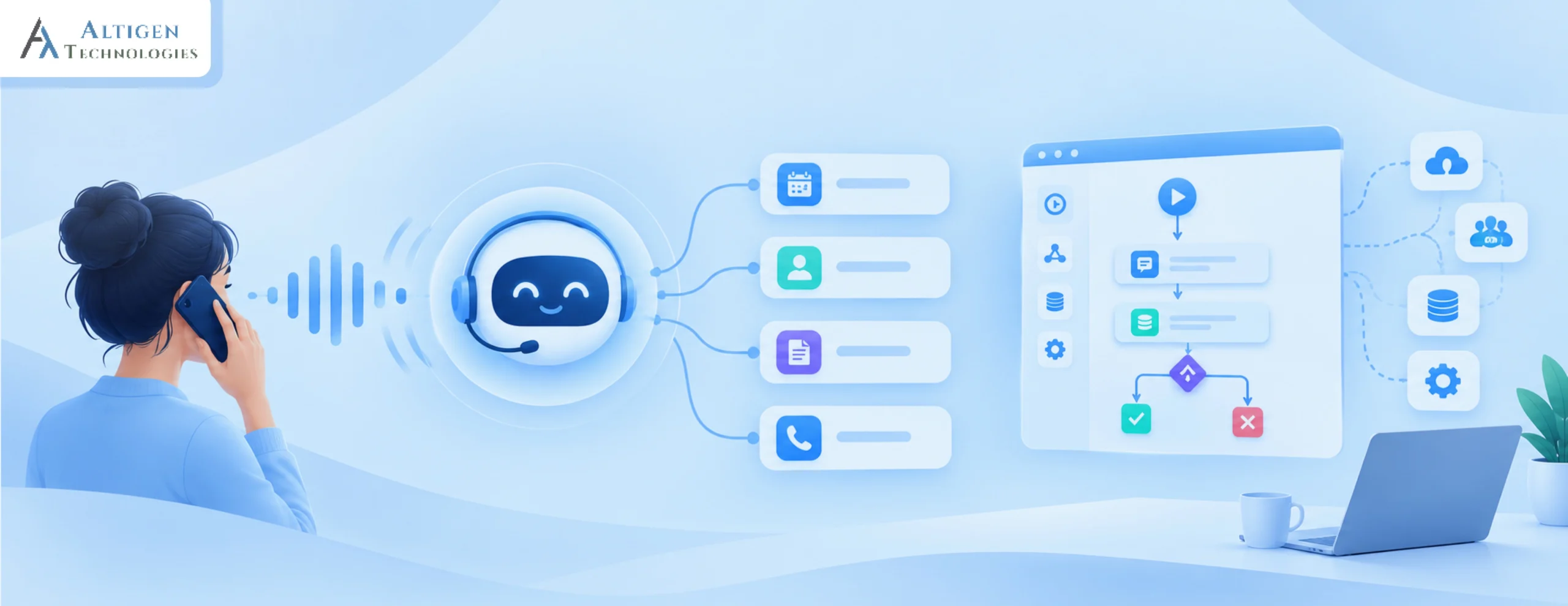
A typical interaction involves four stages: understanding the caller’s request, identifying the intent, retrieving or updating relevant information, and resolving the request or transferring it to a human agent.
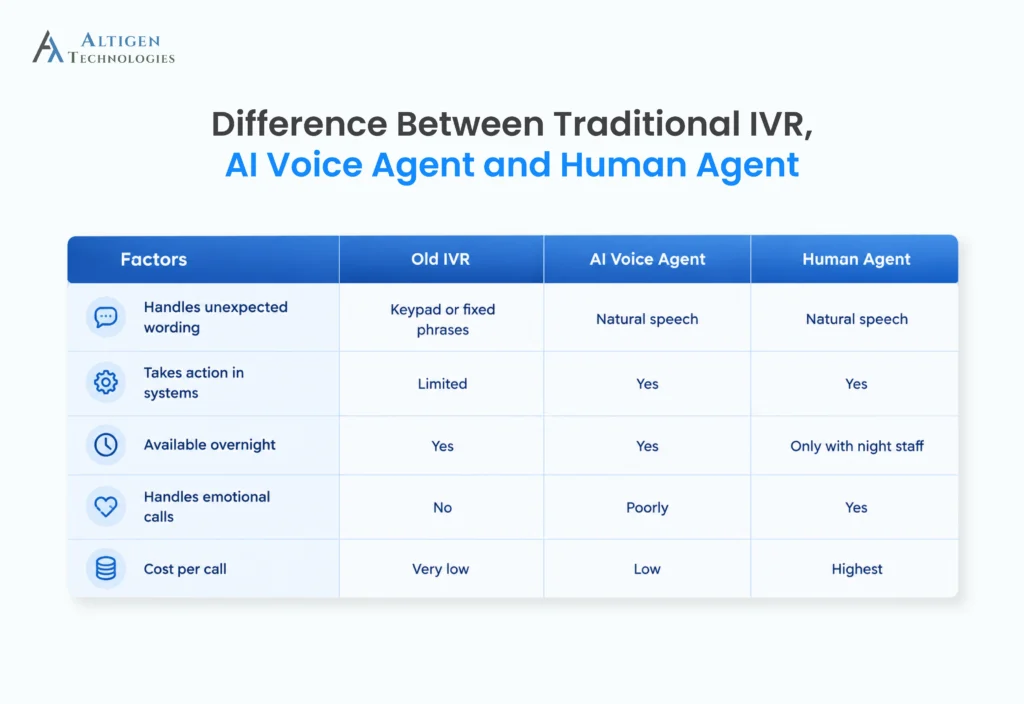
Unlike a traditional interactive voice response (IVR) menu, an AI voice agent can interpret requests expressed in natural language rather than relying solely on predefined menu options.
What do you need before building a conversational AI self-service agent?
Before building a conversational AI self-service agent, prepare your call data, knowledge base, escalation rules, system access, current cost-per-call baseline, and a named owner for the project.
- Your top ten call reasons: Pull them from your phone system or ask supervisors
- Knowledge base content: Written answers to your most common questions
- Escalation rules: Which calls go to a person, and to which team
- System access: Credentials for your CRM, helpdesk, scheduling tool
- Current cost per call: Your baseline, so you can prove the change later
- A named owner: One person responsible after launch
The last item matters more than it looks. Voice agents need tuning in the first few weeks, and projects without an owner go quiet.
On your knowledge base, be realistic about quality. Gartner surveyed 5,728 customers and found that 43% of self-service failures happened because customers could not find content relevant to their issue, the single most common cause of failure. If your written answers are thin, your voice agent will be thin.
How to build an AI voice agent for customer service without code
You can build an AI voice agent for customer service without code by defining its scope, choosing a no-code platform, connecting a knowledge base and business systems, configuring conversation flows, and setting up human handoffs. The following steps apply to most no-code platforms.
Step 1. Define scope and success metrics
Write down what the agent will handle and what it will not. Be specific about the boundary. A query like “loan application status” sounds simple until a caller asks to change their employment details mid-conversation. Decide whether that request is within the scope of the conversational AI agent or requires a transfer to a human agent, and document the rule.
Besides that, you should set the metrics before you build.
- Resolution rate without transfer: Depending on the industry and complexity of the queries, 40% to 60% is a reasonable first target.
- CSAT should not be worse than your human baseline
Suggested Reading: Customer Experience Metrics That Financial Institutions Should Monitor
Step 2. Choose your no-code platform
Pick an AI-first customer self-service platform, not a chatbot tool with voice added later. For example, tools like Altigen’s CoreInteract offer a structured interface for building voice, SMS, chat, and email agents, plus a library of prebuilt agents and a workflow builder for more complex tasks.
Also, consider the following factors:
- Integration depth: Prebuilt connectors for your CRM and helpdesk, not just an API you would need a developer for
- Human handoff: Set the triggers for transfer and ensure the agent passes conversation history to the human agent
- Response speed: Look for fast responses with minimal pauses to keep conversations natural
Step 3. Connect your knowledge base
This step determines whether the agent can answer queries accurately. If the knowledge base is incomplete or inaccurate, the agent may fail to resolve queries or complaints.
Upload your FAQs, policies, and product details. Write them the way you would explain them out loud, in short sentences. Remove outdated pages. An agent is only as accurate as the content behind it.
The agent should answer only from approved content, and it should admit it does not know rather than guessing answers. Ask vendors to demonstrate both situations.
Step 4. Design the conversation flow
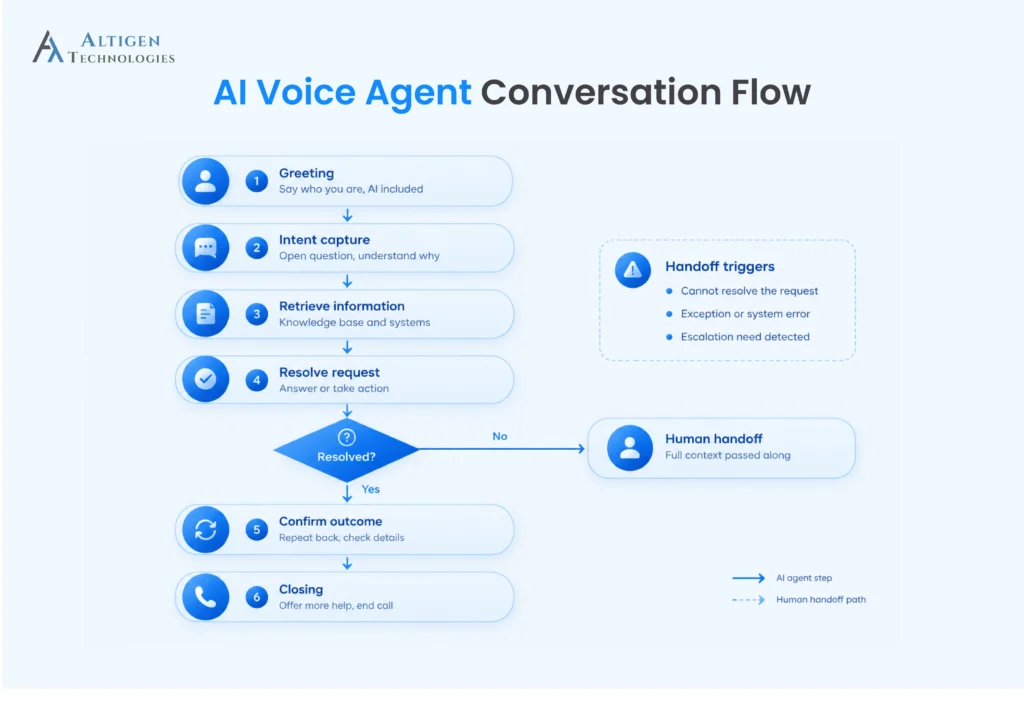
Every interaction should include four stages.
- Greeting: State who you are and that the caller is speaking with an AI assistant. Keep it to one or two sentences.
- Intent capture: Ask an open question such as “How can I help today?” instead of reading a menu. Let callers say it in their own words.
- Resolution: Look up the information, confirm key details back to the caller (order number, appointment time), and then act.
- Closing: Confirm the outcome, offer more help, and end the call politely.
Keep the greeting short. Callers interrupt long introductions.
Define how the agent should handle exceptions. For example, decide what to do when a caller provides an incomplete account number or stays silent for ten seconds.
Step 5. Set voice, tone, and language
Pick a voice that matches how your business sounds, set the formality level, and add the languages your customers actually use.
Write out the phrases the agent repeats, including how it asks for clarification and how it apologises. Test how it pronounces your brand name, product names, and industry terms before launch.
Step 6. Connect your business systems
Connect the voice agent to the systems and tools it needs to access customer information, retrieve records, or update details during a call.
- CRM or core banking system: Retrieve customer profiles and account information.
- Ticketing system: Check support requests and create service tickets.
- Appointment system: Schedule, reschedule, or confirm medical appointments.
- EHR or hospital management system: Retrieve permitted patient information and check appointment details.
Set read and write permissions based on the responsibilities of the conversational AI tool. For example, a banking voice agent may be configured to retrieve account balances and transaction details, while a healthcare voice agent may be permitted to check appointment schedules and retrieve specific patient information. Grant access only to the records and actions required for each use case.
Also, if the information is not available or systems are down, the agent should tell the caller it cannot check right now and offer a transfer, rather than waiting silently.
Step 7. Configure human handoff
Define when the voice agent should transfer a call to a human agent. When transferring a call, pass the conversation transcript, relevant customer or patient details, the reason for the call, and the steps the agent has already taken. A transfer that makes the customer start again is worse than no automation.
So, define the triggers for transferring to a human agent. Here are some examples.
- The caller asks for a person
- Two failed attempts to understand
- The request falls outside scope
- The caller sounds frustrated, if your platform detects sentiment
Next, configure skill-based routing to transfer calls to the appropriate agent or team.
For example, a billing question and a delivery complaint should reach different teams. Also, define a fallback for transfers outside business hours. If nobody is there to handle the interaction, the agent should offer a callback rather than ringing an empty queue.
Step 8. Connect a phone number or your existing system
Connect the agent to the channels your customers use, including voice, chat, SMS, and email. Configure the relevant phone numbers, website chat, messaging services, and email channels through the platform.
Start with one or two channels, test how the agent handles incoming queries and transfers conversations to human agents, then expand to other channels. Check that conversation history and relevant customer details are available when a query moves between channels if you plan to deploy omnichannel interactions.
What are the key factors to consider when choosing a no-code AI voice agent platform?
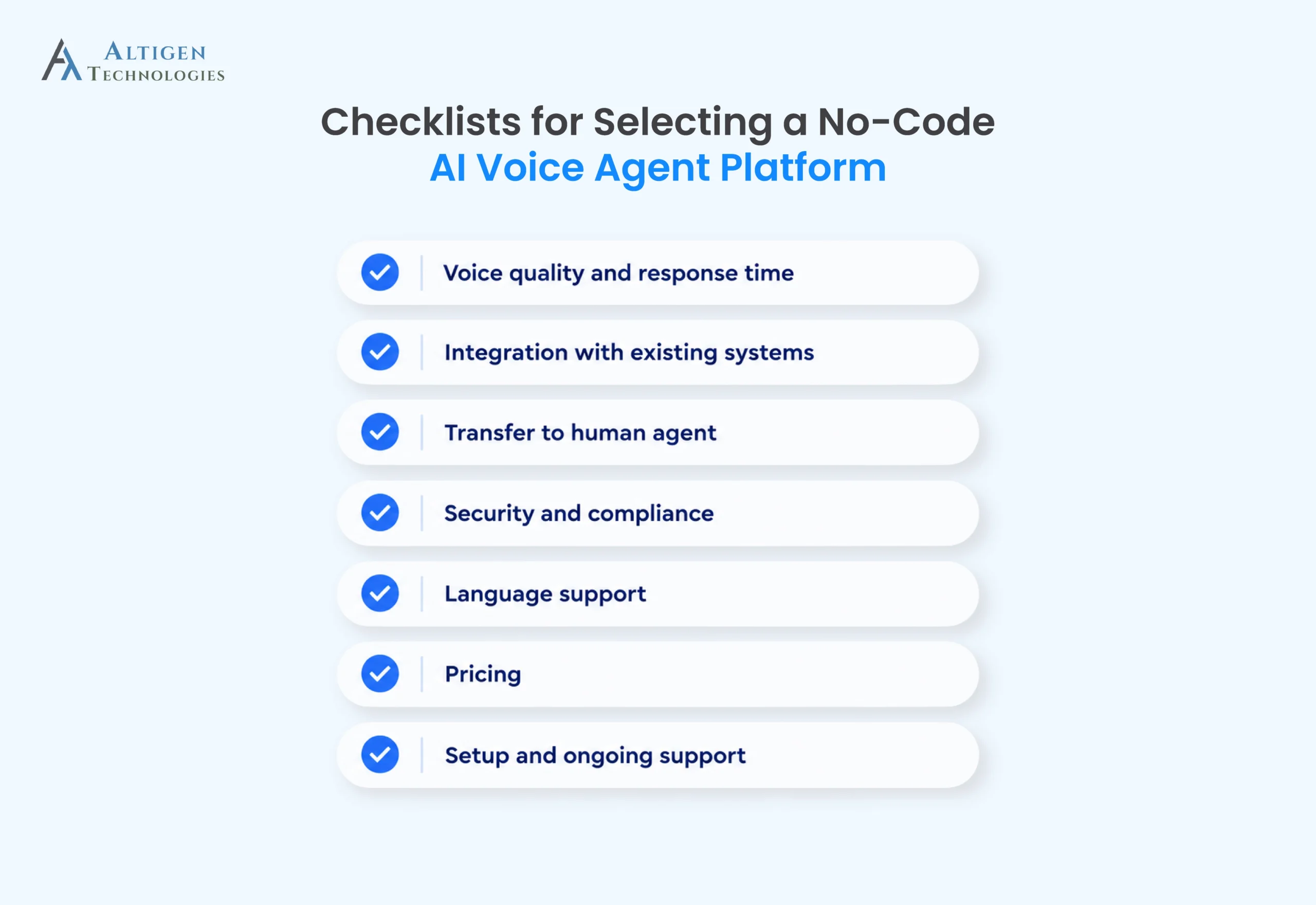
When choosing a no-code AI voice agent platform, evaluate its voice quality, integration capabilities, human handoff options, security and compliance controls, language support, pricing, and ongoing technical support. These factors help you determine whether your team can configure and manage the agent without developer support.
1. Voice quality and response time
Test the agent with real customer questions. Check whether its speech sounds natural, how quickly it responds, and whether it can handle interruptions without losing track of the conversation.
2. Integration with existing systems
The platform should have ready-made connectors for your CRM, helpdesk, ticketing system, or other required tools. Ask the vendor to demonstrate how your team can configure these integrations without writing code.
3. Transfer to human agent
Test what happens when the agent cannot resolve a query or a caller asks for a human. Confirm that calls reach the right team and that the receiving agent gets the conversation history, relevant customer details, and reason for the transfer.
4. Security and compliance
Data security is another critical factor to consider when choosing a conversational AI agent.
According to a Pindrop report, 39% of contact center fraud calls were associated with account takeover attempts, which shows the need to protect customer accounts during interactions.
So, verify the following security and compliance measures:
- Security certifications: Request documentation of relevant certifications.
- Data storage: Confirm where customer data is stored.
- Access controls: Check how access to sensitive customer information is restricted.
- Call recording: Review recording settings, storage, and access permissions.
- Regulatory compliance: Verify the compliance requirements, such as TCPA, GDPR, PCI DSS, and HIPAA, to protect privacy and ensure adherence to industry regulations.
5. Language support
The voice agent should understand the languages your customers speak, including regional accents, everyday expressions, and industry-specific terms. Its ability to understand callers and respond accurately is more important than the number of languages listed on the vendor’s website.
6. Pricing
Compare the pricing models using your expected monthly call volume and average call duration. Include telephony and setup costs in the calculation, and find out whether additional charges will be added when usage exceeds your plan. A platform with a low monthly subscription can still become expensive if it charges separately for call minutes or integrations.
7. Setup and ongoing support
Evaluate how long implementation usually takes, which tasks your team can handle independently, and where vendor assistance is required. Confirm the support available during setup and after launch, including response times for technical issues.
Ask these key questions:
- Usual implementation time
- No-code configuration capabilities
- Vendor help with integrations
- Post-launch technical support
- Response times for critical issues
How much does it cost to implement a conversational AI tool, and what is the ROI?
The cost of implementing a conversational AI tool depends on its pricing model, call volume, integration requirements, and ongoing maintenance. Common pricing models include per-minute charges, per-call or per-resolution fees, and a monthly subscription combined with usage charges.
To estimate ROI, compare the cost of handling calls through AI with your current cost per call, including implementation and operating expenses.
A worked example
Suppose a business receives 10,000 inbound customer service calls each month, including 2,000 order-status inquiries. If an AI voice agent resolves 1,000 of these inquiries without human assistance, the business can compare the cost of handling those calls through AI with its current cost per call.
For illustration, assume each call handled by a live agent costs $5.50, while the AI voice agent costs $1.00 per resolved call in usage and operating charges, excluding initial implementation costs.
- Human handling: 1,000 calls × $5.50 = $5,500
- Voice agent handling: 1,000 calls × $1.00 = $1,000
- Estimated monthly savings: $4,500
These figures are illustrative, not a forecast. Actual savings depend on the business’s cost per call, the proportion of inquiries the AI agent resolves successfully, and the platform’s usage and operating costs. The calculation also excludes initial implementation costs, which should be included when estimating the overall return on investment.
The cost of running a voice agent goes beyond the platform subscription. Businesses should also consider the costs of:
- Telephony: Phone numbers and call-minute charges.
- Integration: Connecting banking systems, CRM, and authentication services.
- Security and compliance: Required controls, audits, and recording policies.
- Knowledge base maintenance: Updating product details, fees, and service policies.
- Ongoing optimization: Reviewing failed queries, correcting responses, and refining call flows.
When a no-code platform is not enough for your business?
A no-code AI voice agent may not be sufficient when your business requires complex legacy-system integrations, strict compliance controls, or infrastructure that can handle very high call volumes cost-effectively. In these situations, custom development or a managed solution may be more suitable.
- Complex integrations: Several legacy systems with custom logic need development help.
- Strict compliance: Regulated industries often need deployment inside their own environment, with specific audit and data residency controls.
- Very high volume: At enterprise call volumes, the economics shift and a managed service or custom build may cost less per call.
How does Altigen CoreInteract help you build no-code AI agents?
Altigen CoreInteract is an AI-first self-service platform that allows businesses to build AI agents for voice, SMS, chat, and email. You can start with prebuilt agents and use the workflow builder to configure more complex interactions without building every workflow from scratch.
Altigen CoreInteract offers several capabilities for creating AI voice agents, including:
- Flexible AI agent creation: Assign personas and skills, start with prebuilt agents, and choose from supported language models and voice providers or bring your own key.
- Integration with existing systems: Use prebuilt integrations with applications such as Salesforce, HubSpot, and ServiceNow to connect agents with your business systems.
- Human handoff and performance tracking: Transfer interactions to human agents with conversation context attached when human assistance is needed. Use reporting to monitor channel activity, frequently used skills, conversation times, and first-contact resolution.
Conclusion
Building a no-code AI voice agent for customer service requires a defined scope, reliable knowledge sources, connected business systems, and clear rules for transferring calls to human agents. The right platform lets businesses configure these workflows without developing an AI system from scratch.
Altigen CoreInteract helps you build AI voice agents that provide a personalized customer experience. Select the queries you want the agent to handle, map out how the conversation should go, connect the systems it needs, and define when it should transfer a call to a human agent.
Book a demo of CoreInteract to see how you can build and configure AI voice agents for your contact center.
Frequently asked questions
Building an AI voice agent can take a few days to several weeks, depending on the conversation flow, integrations, and testing requirements. The process includes preparing the knowledge base, configuring the agent’s responses, connecting business systems, defining when to transfer calls to human agents, and testing real customer scenarios. A no-code platform with prebuilt agents and integrations can reduce configuration time significantly.
AI voice agent platforms can cost between $0.05 and $1.00 per minute for self-service options. Pricing varies significantly by provider, features, industry, and complexity. Enterprise solutions may use custom pricing. To estimate the total cost, calculate your expected monthly call volume and compare the full operating cost with your current cost per customer service call.
No, AI voice agents remove high-volume repetitive calls so your team handles complaints, cancellations, and complex problems. Most businesses redeploy capacity rather than cut headcount.
Yes, most AI voice platforms can handle many accents and languages, but quality varies. You should test with recordings of your own customers rather than relying on a language list in a feature table.
An AI voice agent can protect customer data when it uses appropriate security controls, encryption, access restrictions, and data retention policies. Before choosing a platform, verify where customer data is stored, how call recordings and transcripts are handled, whether customer data is used to train AI models, and which security certifications the provider holds. For regulated industries, confirm that the platform meets applicable requirements, such as HIPAA for protected health information or relevant financial data security obligations.