Transitioning to Microsoft Teams? The Microsoft Teams SIP Gateway lets you connect approved legacy SIP telephony devices like desk phones to Microsoft Teams.
This allows organizations to bring their calling environment into Teams without immediately replacing compatible hardware, making it easier to transition to a Microsoft Teams phone system in phases.
In this guide, we’ll explain how Microsoft Teams SIP Gateway works, which devices it supports, its key benefits, and what to consider before using it as part of a Teams migration.
| TL;DR _ A Quick Takeaway Microsoft Teams SIP Gateway allows organizations to connect compatible SIP phones to Teams without replacing all existing hardware at once. It supports core calling, centralized device management, shared-area phones, and Teams-based authentication and security. Organizations can use SIP Gateway to support a phased Teams migration while continuing to use compatible devices and potentially reducing immediate hardware replacement costs. |
What is Microsoft Teams SIP Gateway?
Microsoft Teams SIP Gateway is a feature that lets organizations connect compatible SIP-based desk phones and conference phones to Microsoft Teams without replacing all of their existing hardware.
It acts as a bridge between SIP devices and Microsoft Teams, allowing supported phones to register with Teams and handle basic calling functions such as:
- Making and receiving calls
- Call hold, resume, mute, and transfer
- Dialing by extension or phone number
- Voicemail access
- Device-based calling features supported by Teams
This can be useful for organizations that already have SIP phones and want to move their calling environment to Teams while continuing to use some of their existing hardware.
How Does Microsoft Teams SIP Gateway Work
Microsoft Teams SIP Gateway allows compatible SIP phones and other SIP devices to connect to Teams for calling, so organizations can continue using supported existing hardware and manage calling through their Teams environment. Compatible devices can make and receive calls to Teams users, other SIP devices, and the PSTN when the required Teams Phone and PSTN connectivity are in place. Here is how the process works.
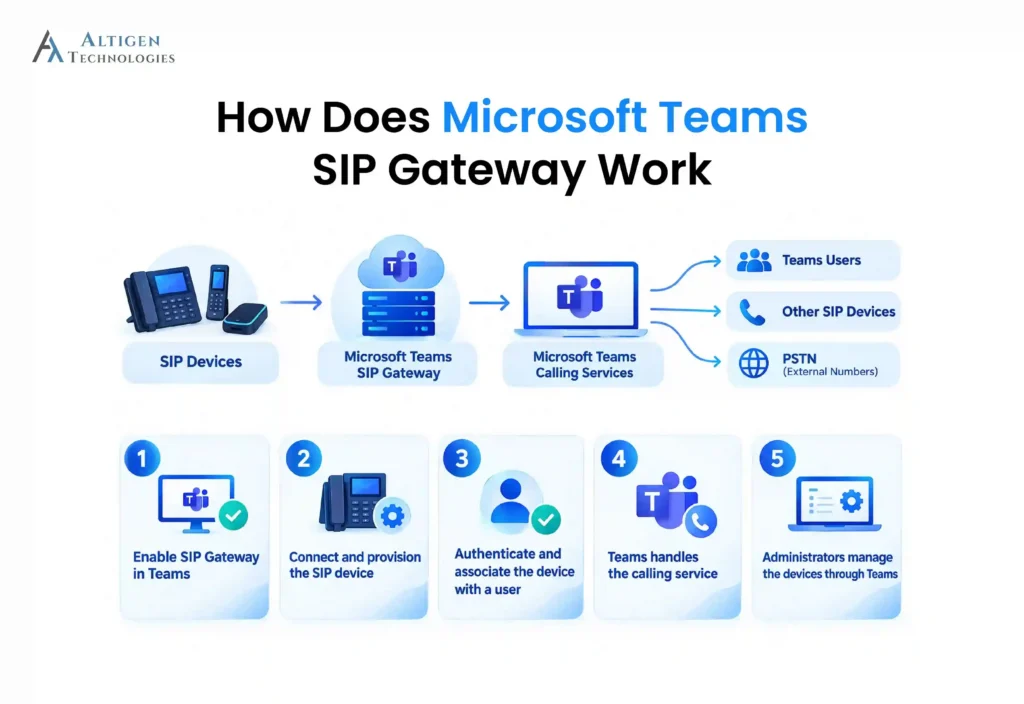
1. Enable SIP Gateway in Teams
An administrator enables SIP device calling through a Teams calling policy and assigns the policy to the relevant users. SIP Gateway is disabled by default for users until this setting is enabled.
2. Connect and provision the SIP device
The compatible SIP phone is configured to use the appropriate Microsoft SIP Gateway provisioning server. Devices can be provisioned individually or in batches through the Teams admin center. Microsoft also requires supported firmware and specific network access for SIP Gateway traffic.
3. Authenticate and associate the device with a user
After provisioning, the user signs in using their corporate credentials. SIP Gateway uses a web-based authentication and pairing process to associate the physical SIP device with the user’s Teams account.
4. Teams handles the calling service
Once registered, the SIP device can use Teams calling services. Depending on the organization’s configuration, users can call Teams users, other SIP devices, or external numbers through the PSTN.
5. Administrators manage the devices through Teams
IT teams can view enrolled SIP devices in the Teams admin center, monitor their status, restart devices, and synchronize policy changes. Microsoft also supports bulk sign-in for up to 100 devices per batch, which can simplify larger deployments.
What Are the Key Features of Microsoft Teams SIP Gateway
Microsoft Teams SIP Gateway offers the following key features:
- Device Compatibility: Supports approved third-party SIP-based phones (e.g., Cisco, Poly, Yealink), so you can keep using existing devices. (Some limitations may apply)
- Core calling features: Access essential Teams calling features on your SIP devices, including call transfer, hold, caller ID, and voicemail.
- Voicemail integration: Access Teams voicemail directly on supported SIP devices.
- Centralized management: Manage enrolled devices through the Teams admin center, giving IT teams a central place to monitor and manage SIP endpoints.
- Secure communication: Benefit from modern authentication and encryption, aligned with Microsoft’s latest security standards.
- Flexible migration: Transition to Teams-certified devices at your pace, balancing convenience and budget.
- Enhanced call handling: Support calling features such as call forwarding and transfer through the Teams calling environment, subject to device and configuration support.
What Are the Benefits of Using Microsoft Teams SIP Gateway
Microsoft Teams SIP Gateway can help organizations extend Teams calling to compatible SIP phones without replacing every existing endpoint. This is useful for businesses that already have SIP-based desk phones or shared-area devices and want to bring them into their Teams calling environment. Here are the six key benefits of Microsoft Teams SIP gateway.
1. Cost savings
Reuse existing compatible third-party hardware (such as phones from Cisco, Poly, Yealink, and AudioCodes) instead of replacing all devices at once.
2. Connect compatible SIP phones to Teams calling
Once provisioned and associated with a Teams account, compatible SIP devices can make and receive calls through the Teams calling environment. Depending on the organization’s configuration, users can call:
- Teams users
- Other supported SIP devices
- External numbers through the PSTN
3. Centralize device administration
IT teams can manage enrolled SIP devices from the Teams admin center, including viewing device status, restarting devices, signing users out, and synchronizing policy changes. This gives administrators a central place to manage SIP endpoints alongside their broader Teams environment.
4. Support shared and common-area phones
SIP Gateway can be used for phones in locations such as reception areas, lobbies, meeting spaces, and other shared environments. Microsoft also supports remote sign-in for common-area phones, which can reduce the need for physical access during deployment.
5. Enhanced security
SIP Gateway uses Microsoft Teams authentication and security mechanisms to help protect access to connected SIP devices. Devices are associated with users through the Teams authentication process, while calling traffic is protected using Microsoft’s supported security and encryption mechanisms.
This helps organizations bring compatible SIP phones into the Teams environment without managing a separate security framework for those devices.
6. Support emergency calling
For compatible SIP devices, SIP Gateway supports dynamic emergency calling using network attributes such as local IP/subnet information or chassis and network-port details. This can help route emergency calls to the appropriate emergency location when the required configuration is in place.
One important limitation of SIP Gateway is that it does not make every SIP phone compatible with Teams. Organizations need supported devices and firmware, appropriate Teams licensing/calling configuration, and the required network access.
Why Choose Altigen for Microsoft Teams and SIP Gateway solutions?
When it comes to Microsoft Teams and SIP Gateway solutions, Altigen stands out with unmatched expertise and customer care. Here’s why we’re the trusted choice for businesses seeking a seamless transition:
- Tailored Solutions: We provide transparent pricing and solutions customized to your organization’s needs, helping you minimize costs and maximize efficiency.
- Smooth Migration: Our team ensures a hassle-free migration to Teams with a streamlined implementation process that saves you time and resources through teams migration services.
- Dedicated Support: With Altigen, you’ll have a responsive, expert team supporting your Teams setup and SIP Gateway functionalities every step of the way.
Conclusion
Microsoft Teams SIP Gateway can be useful for businesses that want to move their calling to Teams while continuing to use compatible SIP phones during the transition.
A phased approach can help businesses move to Teams without disrupting day-to-day calling or replacing hardware unnecessarily. Altigen can support this transition with Teams migration services and calling solutions tailored to the organization’s existing setup.
Ready to upgrade your communication setup? Contact us to discuss how Altigen can help your organization make the most of Microsoft Teams and the SIP Gateway and experience a future-ready communication solution.

Frequently Asked Questions
Microsoft Teams SIP Gateway supports selected SIP phones from vendors including Cisco, Poly, AudioCodes, Yealink, and Alcatel-Lucent Enterprise. Compatibility depends on the specific model and supported firmware. For example, Cisco IP phones must use multiplatform firmware before they can be onboarded. Microsoft maintains the current supported-device requirements.
Yes, but only compatible SIP devices can connect directly through SIP Gateway. This means an older desk phone is not automatically supported because it uses SIP. Organizations should check the exact model and firmware against Microsoft’s supported-device requirements before planning a migration. Microsoft also supports certain analog devices through AudioCodes ATAs.
Yes, Microsoft Teams SIP Gateway can help reduce replacement costs when an organization already owns compatible SIP phones because those devices may continue to be used with Teams instead of being replaced immediately. However, the actual savings depend on device compatibility, licensing, network requirements, and the organization’s migration strategy. SIP Gateway itself should not be presented as a guaranteed hardware-cost reduction.
SIP Gateway connects compatible SIP devices directly to Teams, allowing supported phones to use Teams calling services. Direct Routing connects Teams Phone to external telephony infrastructure through a certified Session Border Controller (SBC). It is commonly used for PSTN connectivity and scenarios involving third-party PBXs, analog devices, or specialized routing requirements.
Altigen provides Microsoft-certified Direct Routing for Teams Phone, along with SIP voice services, number porting, new number assignments, E-911 services, and local and international calling plans. Altigen says its migration service covers planning, user setup, and system cutover, helping organizations manage the technical transition to Teams calling.