Press 1 for sales. Press 2 for billing. Press 3 to hear this menu again. It’s the first thing customers listen to when they contact customer support. But for many businesses, legacy IVR systems can’t deliver a good customer experience.
According to a McKinsey report, seven out of ten companies report their IVR containment rate is 30 percent or less. This means most calls that enter the menu still end up escalating to a human agent anyway.
However, the technology behind a modern contact center does not follow the rigid, “press 1 for sales” menus. Now it connects to CRM records, routes calls based on skills and intent, and usually runs inside a platform your team already uses every day: Microsoft Teams.
This guide covers what IVR actually is, how it works inside a Teams contact center, and what separates a good setup from one that frustrates callers before an agent ever picks up.
| TL;DR – 30 Seconds Quick Takeaway 1. Modern IVR uses AI, CRM data, and skill-based routing to connect callers with the right resource faster and improve the overall customer experience. 2. In a Microsoft Teams contact center, IVR works with Teams Phone and contact center software to automate call routing and keep every interaction in one platform. 3. Natural language recognition, self-service, CRM integration, and real-time analytics help improve first-call resolution and reduce agent workload. 4. Simple menus, regular testing, data-driven optimization, and a clear path to a live agent are essential for a better IVR experience. |
What is IVR
IVR means interactive voice response. It’s a technology that allows a computer system to interact with callers through voice or keypad input, then routes them to the right department, agent, or self-service option without a human answering first.
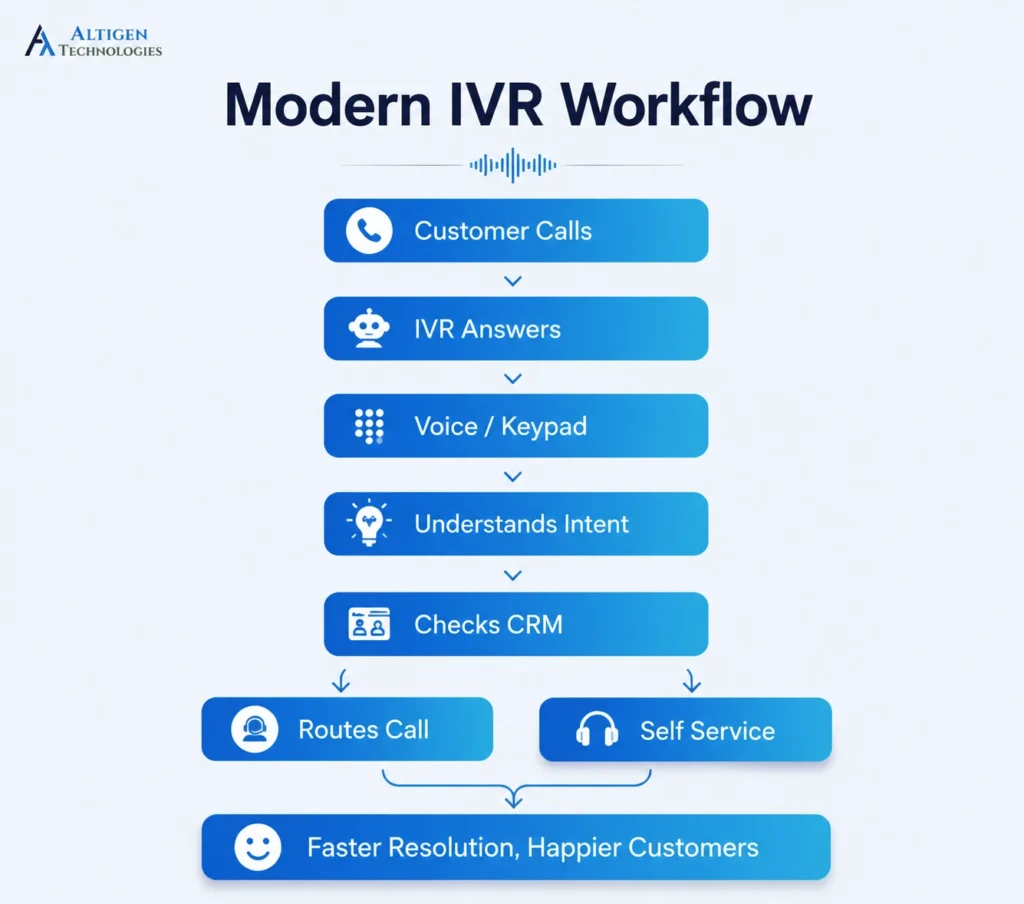
Here’s how a modern IVR system works:
- A customer calls your business, and the IVR answers the call automatically.
- The system greets the caller, gathers their request through voice or keypad input, and identifies them using CRM or helpdesk data when available.
- Based on the caller’s input, predefined rules, or AI-driven intent recognition, the IVR routes the call to the appropriate agent, queue, or self-service option.
- If no suitable agent is available, the system places the caller in a queue, offers a callback, transfers the call, or directs them to voicemail.
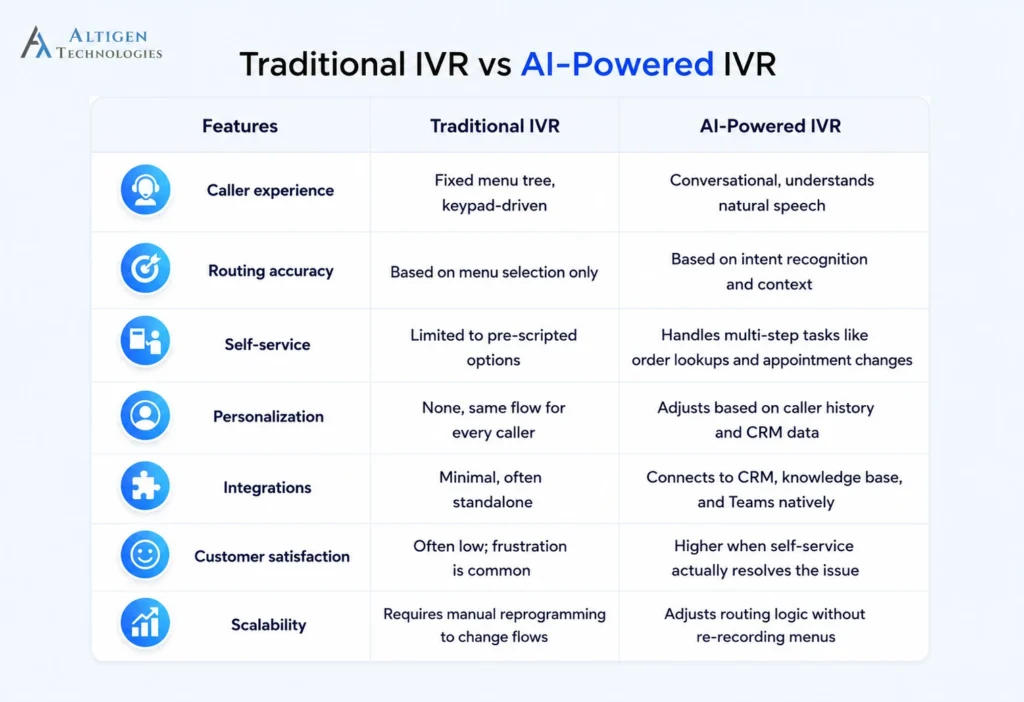
Unlike traditional phone menus that rely on keypad input and rigid, pre-recorded scripts, modern interactive voice response adds natural language understanding, so a caller can say “I need to check my order status” instead of guessing which numbered option applies.
Modern IVR systems connect to a CRM, ticketing system, or knowledge base in real time, so the routing decision reflects who the caller is and what they need, not just which button they pressed.
According to a survey by Vonage, 51% of consumers have abandoned a business entirely after reaching an IVR menu, and businesses lose an estimated $262 per customer each year as a result.
How does a Microsoft Teams IVR system work
A Microsoft Teams contact center combines Teams Phone with either native auto attendant capabilities or a certified contact center platform to build a full IVR experience. Here’s how a customer call flows through the IVR before reaching an agent.
1. Customer calls your Teams contact center
The call arrives through a number connected to Teams Phone, whether that’s a ported number, a newly assigned one, or a number brought in through Direct Routing or Operator Connect.
2. IVR greets the caller
An automated greeting plays first. Depending on how the flow is designed, the caller hears a short spoken menu or is invited to describe what they’re calling about in their own words.
3. Customer selects or speaks an option
The caller responds, either by pressing a key or speaking naturally, depending on whether the system relies on DTMF, speech recognition, or a combination of both. A caller checking an order, for instance, might simply say “I want to check my delivery status” instead of navigating three menu levels to find it.
4. IVR identifies intent
In AI-enabled systems, natural language processing interprets what the caller actually needs instead of matching their words to a fixed menu tree. This is the step where intent recognition accuracy matters most: get it right, and the call routes correctly the first time; get it wrong, and the caller ends up in the wrong queue, adding an avoidable transfer before the conversation even starts.
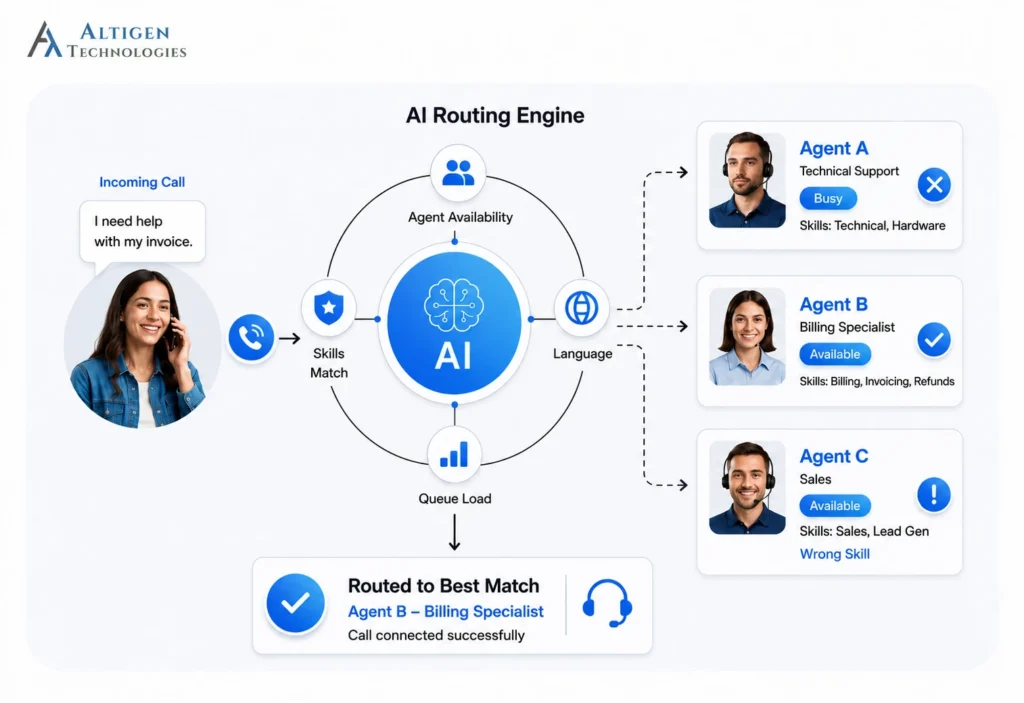
5. Skills-based routing selects the best agent
Once intent is known, the system checks agent availability, skill set, language, and current queue load, then routes the call to whoever is best equipped to handle it. A billing question and a technical outage call may both come from the same customer segment, but they need different agents, and this is the step that tells them apart, factoring in queue time and occupancy across the team.
6. CRM data is displayed to the agent
In the next step, a screen pop displays the caller’s account details, interaction history, and reason for calling. This gives agents the context they need before answering the call, which reduces average handle time (AHT) and minimizes after-call work.
7. Conversation continues in Microsoft Teams
From the first greeting to the live conversation, everything happens inside the same Teams environment agents already use for chat, meetings, and collaboration. If the call needs to escalate to a specialist or supervisor, that handoff happens without anyone switching tools or losing context.
What are the key features to look for in a modern IVR system
The features that separate a modern IVR from a traditional system are natural language recognition, CRM integration, skill-based routing, self-service capability, real-time analytics, and native platform integration.
Natural language and speech recognition
This feature allows callers to say what they need in their own words (for example: “I want to check my order status”) instead of navigating a nested menu of numbered options. This is one of the biggest reasons for lower abandonment and faster containment.
CRM and account data integration
The IVR pulls up the caller’s account, order history, or ticket status automatically, using caller ID or an entered account number, so the caller doesn’t have to repeat information the business already has.
Skill-based and intent-based routing
Once the IVR understands what the caller needs, it routes the call to the agent or team best equipped to handle it, rather than simply sending it to the next available person. This improves first call resolution, rather than just moving the wait time earlier in the call.
Suggested Reading: How to Set Up Skill-Based Call Routing in Microsoft Teams Contact Center
Dynamic menus based on caller context
A returning customer with an open support ticket hears options built around that ticket, while a first-time caller gets a standard greeting because the IVR already knows why the customer is calling.
Self-service for routine transactions
Modern IVR systems can handle routine requests such as bill payments, appointment scheduling, and order status checks without transferring callers to a live agent. It helps businesses reduce call volumes, shorten wait times, and free agents to focus on more complex customer conversations.
The key benefits of self-service include:
- Faster issue resolution
- Lower call volumes
- Lower wait times
- 24/7 customer support
- Consistent service experience
According to Salesforce’s State of the Connected Customer report, 69% of customers say it’s important for companies to offer self-service options, making this a core capability of any modern IVR system.
Real-time analytics and reporting
Real-time analytics provide visibility into containment rate, abandonment rate, and where callers drop off within the IVR, helping you identify and fix problem areas faster.
Integration with your existing platform
A modern IVR should integrate seamlessly with the communication and business tools your team already uses. When connected to Microsoft Teams, CRM systems, and other business applications, it keeps customer data, routing, reporting, and agent workflows synchronized without requiring users to switch between multiple tools.
Best practices for designing an effective IVR system
- Keep menus short: Limiting the main menu to five or fewer options, with no more than three choices per branch, keeps callers from getting lost or hanging up mid-flow.
- Offer self-service first: Let callers resolve simple requests on their own before sending to a queue.
- Always provide an agent option: Some callers will still need to speak with a person, so make it easy to reach a live agent.
- Use customer data for routing: Pulling account history or prior interactions into the routing decision avoids repeat questions and speeds up resolution.
- Review analytics regularly: Monitor metrics like abandonment rate, escalation rate, and intent recognition accuracy to identify issues early.
- Test call flows: Test every possible call path before making changes live to ensure callers reach the right destination.
- Avoid deep menu structures: Keep menus short and simple so callers can reach the right option quickly.
Final takeaway
IVR has changed significantly since the days of rigid, key-press-only menus, and the difference is reflected in caller experience and operational efficiency and operational efficiency. A modern IVR system inside Microsoft Teams recognizes intent, pulls in CRM data to personalize interactions, and connects customers to the right agent with minimal effort.
If you’re looking to build a Microsoft Teams contact center with intelligent IVR, Altigen CoreEngage provides that. Its AI-powered routing, CRM integration, and advanced call management help you deliver faster, more personalized customer experiences.
Contact us today to see how CoreEngage can modernize your customer service operations.
Frequently asked questions
An IVR system plays a greeting, collects input from the caller, then routes the call or provides information based on that input, often pulling in CRM data or intent recognition for accuracy.
An auto attendant typically handles basic call routing to extensions or departments, while IVR includes deeper interactive logic, such as self-service workflows and CRM-informed routing.
Yes. Teams Phone combined with a certified contact center platform supports IVR through auto attendants, call queues, and AI-driven routing, all inside the Teams interface.
Faster routing, lower wait times, higher first-call resolution, and reduced operational costs are among the most measurable benefits.
It’s an IVR system built to run natively within Microsoft Teams, using Teams Phone for calling and a contact center platform for routing logic, analytics, and agent tools.
Yes. Most modern IVR platforms connect to CRM systems to pull caller history and account details, both to inform routing and to prepare agents before the call connects.
Best practice is five or fewer options at the main menu level, with no more than three choices per sub-branch, to avoid frustrating callers with too many decisions.