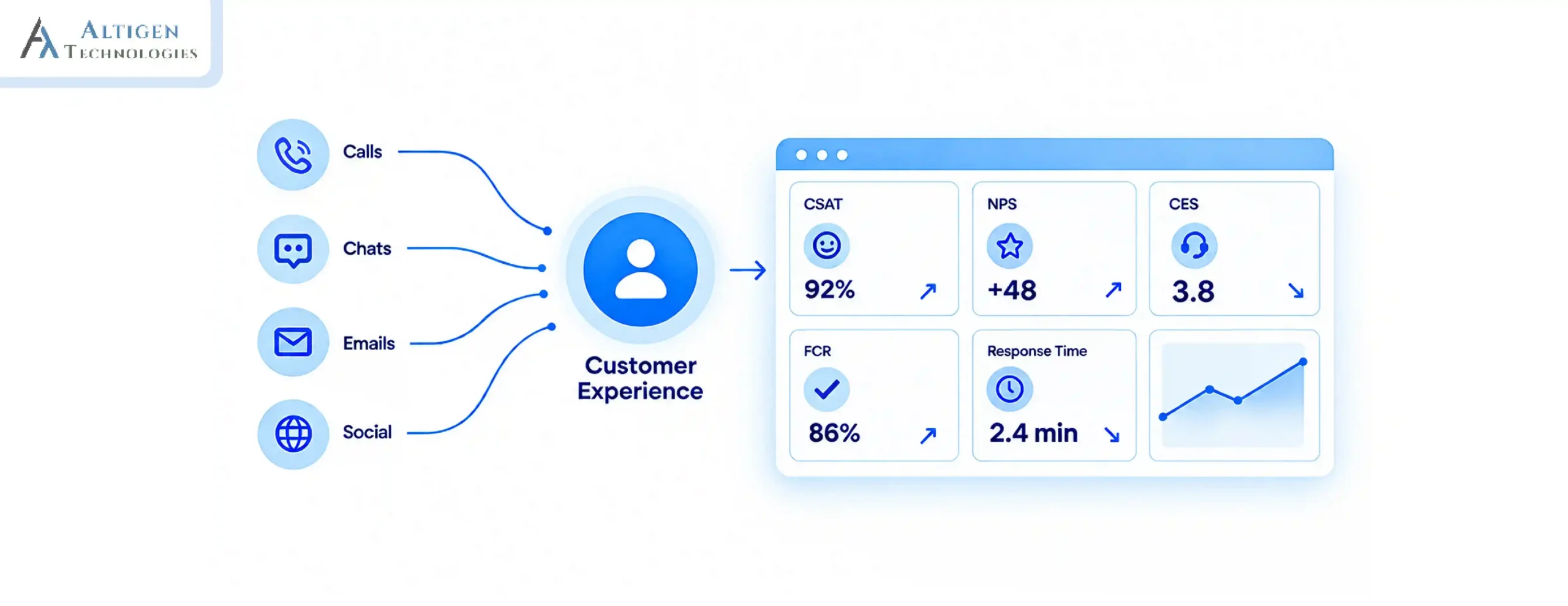
A customer calls in with a billing dispute. The agent who picks up the call says, “This is not the billing team”. The call gets transferred. The next agent asks the customer to explain the issue again, their third time in eight minutes, and the call still is not resolved.
This is not rare. 60% of failed first call resolution attempts trace back to agents lacking the right data and resources to solve the issue, according to LiveAgent’s 2025 Call Center Statistics. Most of that gap starts with one decision made before the agent ever picks up: which call routing software directed the call to that agent in the first place.
Skill-based call routing fixes this by automatically matching the caller’s needs to the agent best equipped to resolve them. This guide explains how it works, how it fits within broader call routing software, and exactly how to configure it inside a Microsoft Teams contact center.
| TL;DR – A Quick Takeaway Skill-based routing helps customers reach the right agent on the first try instead of being transferred two or three times before anyone can actually help them The result: first call resolution improves enough to move CSAT and NPS in the same quarter, not just in a year-end report Setting it up requires four components working together, an IVR system, automatic call distribution, documented agent skill profiles, and routing rules, not just one piece of software Getting it right in Microsoft Teams depends on choosing the correct integration model (Connect, Extend, or Unify) before configuring proficiency ratings, queues, and fallback rules |
What is call routing and how does it work
Call routing is the process of directing an incoming customer interaction like a phone call, live chat, or message to the most appropriate available agent or team. The goal is to reduce wait times, improve first-contact resolution, and ensure customers reach someone who can help.
The global contact center transformation market, which includes intelligent call routing as a core segment, is valued at $46.11 billion in 2025 and is projected to reach $95.85 billion by 2030 at a 15.76% CAGR, per Mordor Intelligence. That growth reflects businesses moving away from routing calls by whoever is free next, toward routing by who can actually solve the problem.
How does call routing work?
The following workflow shows how a customer interaction is routed to the most suitable available agent.
- The customer contacts support.
- An IVR system or chatbot identifies the customer’s intent.
- The system retrieves customer information, such as CRM data, account tier, and language preference.
- The routing engine evaluates agent skills, availability, proficiency, and business priorities.
- The interaction is assigned to the best-matched available agent.
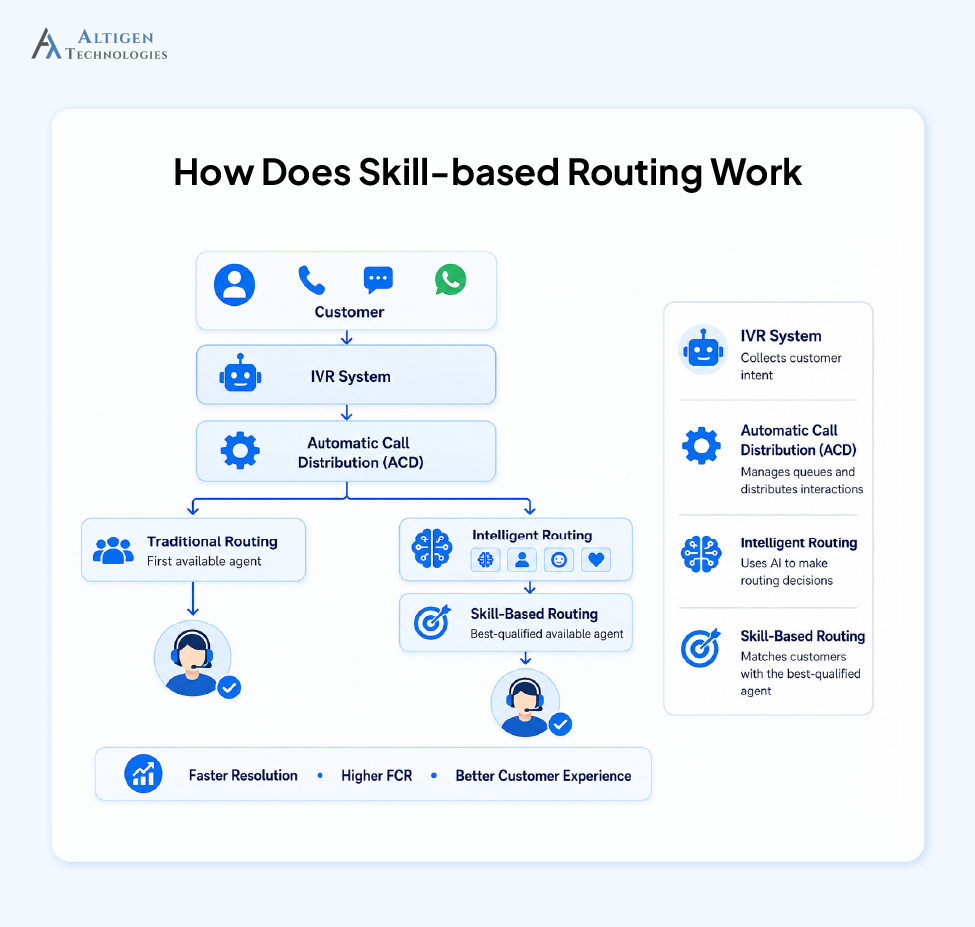
A skill-based routing engine uses the following criteria to identify the best match:
- Each agent is tagged with specific skills: product knowledge, languages, certifications, account-tier experience
- Each skill carries a proficiency rating, not just a yes/no flag. An agent rated 5/5 in billing should be prioritized over one rated 2/5, assuming both are available
- The system still balances workload within a matched skill group, so the top-rated agent does not get every single call just because they are the best match
- The routing decision happens in seconds, before the call even reaches the agent.
For example, a customer calling about a Microsoft Teams licensing issue, speaking Spanish, gets matched to an agent with both Teams expertise and Spanish proficiency, not whichever bilingual agent happens to be idle, and not whichever Teams expert happens to be free. The system requires both matches at once.
Call routing vs automatic call distribution (ACD) vs skill-based routing
| Call routing | ACD (Automatic Call Distribution) | Skill-based routing | |
| What it is | The umbrella concept: deciding where an interaction should go | The engine that executes that decision, queuing and delivering the call | One strategy the engine can use to make the decision |
| Role in the system | Defines the goal of routing to the right destination | Carries out the delivery once a destination is set | Supplies the matching logic ACD uses to pick a destination |
| Alternatives / variants | Not applicable, this is the overarching concept | Can run on different distribution strategies | Others include round-robin and longest-idle |
How to set up skill-based call routing in a Microsoft Teams contact center
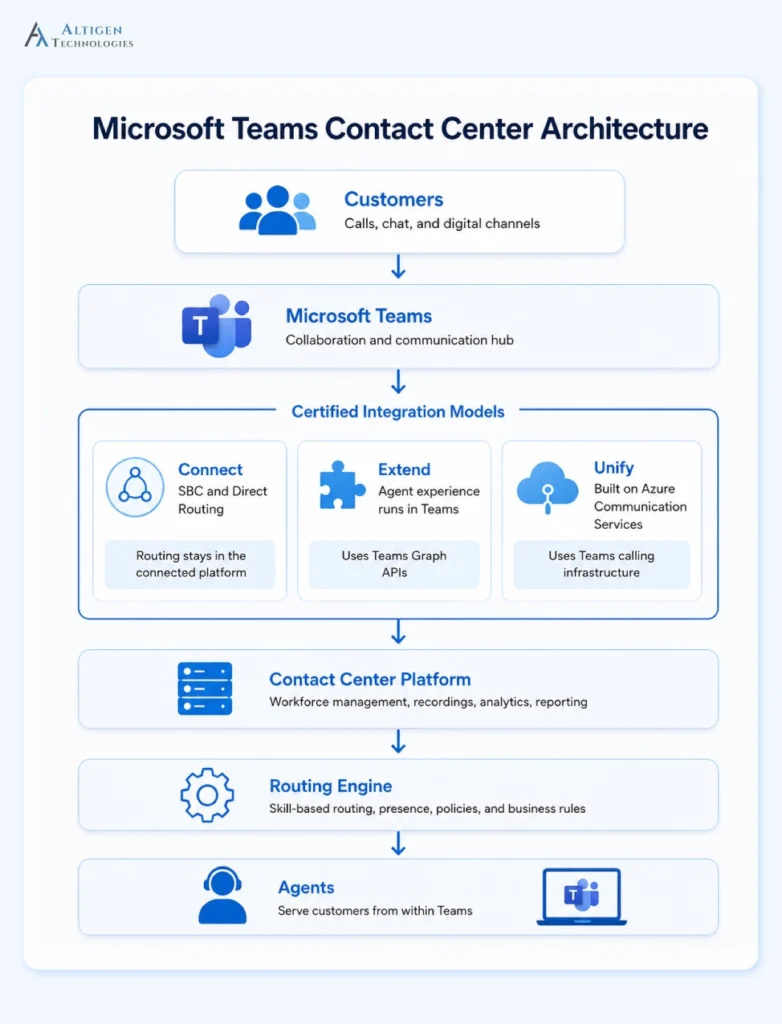
Microsoft defines three certified integration models for connecting a contact center to Teams: Connect (SBC and Direct Routing, routing stays in the connected platform), Extend (the agent experience runs inside the Teams client using Teams Graph APIs), and Unify (built natively on Azure Communication Services using Teams calling infrastructure). Know which model applies before configuring routing, since presence and API behavior differ across all three.
Step 1. Define agent skills
List the skills relevant to your operation: product lines, languages, certifications, account tier experience. Keep the initial list focused rather than exhaustive. A bloated skill taxonomy is a common cause of routing accuracy degrading over time.
Step 2. Assign proficiency levels
Use a rating model per agent, per skill. Microsoft’s own skill-based routing guidance recommends a 1 to 10 scale rather than a coarser 1 to 5, since narrower bands lose precision when several agents share a skill. Binary tagging loses the nuance that makes routing accurate.
Support both exact match (only route to agents meeting the required rating) and closest match (route to the nearest available rating when no exact match exists), and decide which approach each workstream requires before go-live.
Step 3. Configure queues
Align queues to skill categories rather than generic departments. A narrowly defined queue routes more accurately than a broad “technical support” catch-all.
For example, in an omnichannel contact center, queues can be configured across voice, chat, messaging, and other channels using the same skill-based routing logic, ensuring customers are matched with the right resource regardless of how they reach out.
Step 4. Create IVR menus
Capture only what the routing engine needs to disambiguate: language, issue category, account type. Keep menus short. Every added layer increases abandonment risk and, in models where routing checks live presence, adds latency before that check even runs.
Step 5. Build routing rules
Routing rules define the order the engine follows when more than one agent could take the call. Set them in this sequence:
- Exact match first. Route only to agents meeting the required proficiency rating (e.g., 8+ for billing disputes).
- Closest match if no exact match is free. Route to the nearest available rating (e.g., 6–7) rather than leaving the call queued indefinitely.
- Tie-break within a matched tier by workload, not proficiency alone, so the highest-rated agent in a tier doesn’t absorb every call.
- Set a routing timeout for how long the engine waits at each tier before dropping to the next one; this is what triggers the overflow behavior configured in step 6.
Step 6. Configure overflow and fallback
Define what happens when Step 5’s timeouts run out. For example: require a proficiency of 8 or higher, fall back to closest match (6 to 7) after 90 seconds, then a generalist queue, then a supervisor if the wait exceeds 5 minutes.
If presence data comes through the Microsoft Graph API, allow slightly longer timeouts. Minor synchronization delays are normal, and overly aggressive timeout settings can trigger overflow too early. This step also breaks first in production, usually during volume spikes.
Step 7. Test routing scenarios
Run test conversations across every skill and proficiency combination. Confirm exact match works when a qualified agent is free, closest match or fallback engages when it isn’t, overflow and escalation trigger at the right thresholds, and presence data stays current enough for routing to hold up under load.
What you need before setting up skill-based routing
These four components are essential for implementing skill-based routing. Without any one of them, the routing engine cannot function as intended.
- IVR system: Collects the intent signal that tells the routing engine what skill is needed
- Automatic call distribution (ACD): The engine actually distributing calls once skill requirements are determined
- Agent skill profiles: Documented skills, proficiency ratings, and real-time availability for every agent
- Routing rules: The business logic that defines priority order, what happens during overflow, and fallback behavior when no perfect match is available
Why traditional routing does not work for enterprises
Traditional call routing often falls short in enterprise environments because it routes interactions based on agent availability rather than customer needs or expertise. The result is unnecessary transfers and lower first-call resolution.
According to SQM Group, 38% of failed first-call resolutions are agent knowledge gaps. The key reasons traditional call routing does not work for enterprises include:
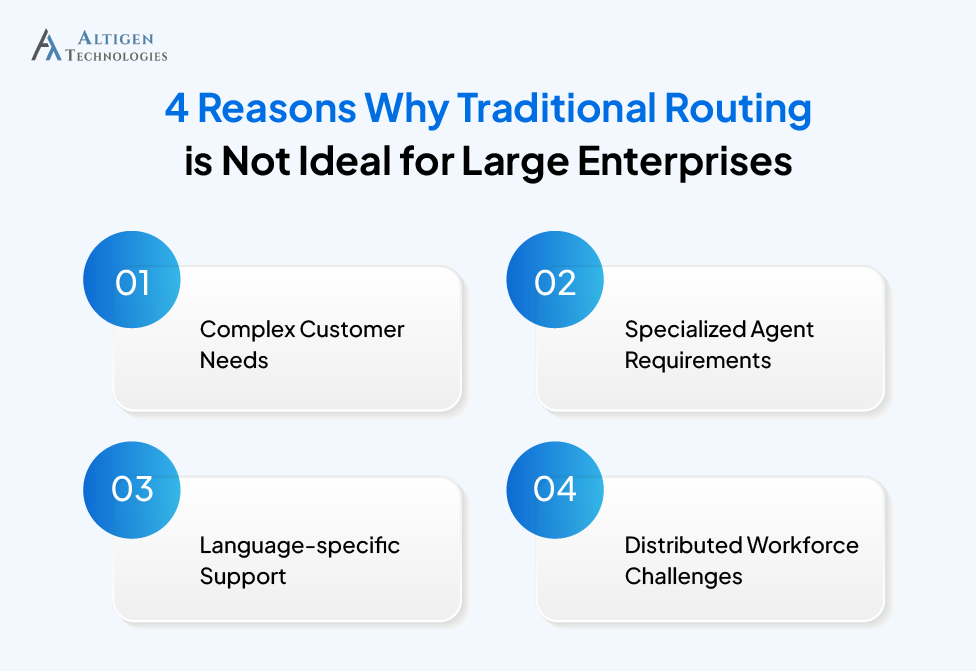
1. Complex customer needs
Enterprise customers expect to speak with agents who understand their products, account history, service agreements, and previous interactions. Assigning the next available agent often results in unnecessary transfers and longer resolution times.
2. Specialized agent requirements
Networking issues, Microsoft Teams licensing questions, and billing inquiries each require different expertise. Routing all interactions through the same queue increases the likelihood of transfers, repeated explanations, and slower resolutions.
3. Language-specific support
Customers expect assistance in their preferred language. Without language-based routing, interactions may reach agents who cannot communicate effectively, increasing handling times and reducing customer satisfaction.
4. Distributed workforce challenges
In hybrid and remote contact centers, routing based solely on availability overlooks differences in expertise, certifications, and real-time presence. Combining these factors ensures customers reach qualified agents regardless of location.
Suggested Reading: How to Evaluate Contact Center Solution for Enterprise Teams
Best practices for Microsoft Teams call routing
- Keep IVR menus to three or four options; longer menus increase hang-ups before routing even happens
- Review skill assignments monthly rather than annually because agent expertise changes faster than most organizations update their records
- Balance workload, not just expertise; routing every call to the top-rated agent burns them out
- Build fallback routing into every queue from day one, not after the first outage
- Monitor queue performance daily for the first month, then shift to weekly once patterns stabilize
- Update skill profiles immediately after training or certification, not at the next scheduled review
- Track FCR and transfer rate together; a rising transfer rate with falling FCR usually points to skill data drift
The key metrics you should track after deployment
A 1% FCR improvement saves a midsize contact center an estimated $286,000 a year, per Ringly’s 2026 analysis, making the business case for skill-based routing concrete rather than theoretical.
| Metric | Why It is Important |
| First Call Resolution (FCR) | Every 1% improvement in FCR lifts CSAT by 1% and NPS by 1.4 points |
| Average Handle Time (AHT) | AHT should decrease as agents spend less time on issues outside their expertise |
| Transfer Rate | A rising transfer rate after deployment shows skill tagging or proficiency data needs review |
| Queue Wait Time | Indicates whether skill groups are appropriately staffed relative to incoming volume by category |
| Service Level | Measures whether calls are answered within target time, segmented by skill group to spot gaps |
| Occupancy | Tracks whether top-rated agents in any skill group are being overloaded relative to peers |
| CSAT | The 2026 benchmark range is 75-84%, per Digital Minds BPO, and should be tracked by skill group to find where routing underperforms |
| Abandonment Rate | A leading indicator of queue mismatches; rising abandonment in a specific skill group usually means understaffing in that category |
Suggested Reading: How to Reduce Average Handle Time (AHT)
Final thought
Skill-based routing is not a feature you switch on once and forget. It depends on accurate, regularly maintained skill data, a well-designed IVR or intent layer feeding it the right signals, clear fallback logic, and reporting that catches drift before it shows up in complaints. Done well inside a Microsoft Teams contact center, it reduces misroutes, lifts first call resolution, and gives every agent the context to do their best work from the first interaction, not the third transfer.
Altigen builds Microsoft Teams contact centers with intelligent call routing, automatic call distribution, and skill-based matching configured around how your team actually works. Contact Altigen to implement intelligent call routing in your Microsoft Teams contact center.
Frequently asked questions
Automatic call distribution (ACD) is the broader system that queues and distributes calls. Skill-based routing is one strategy within ACD; others include round-robin and longest-idle.
Routing that uses AI, such as intent detection or sentiment analysis, often working alongside skill-based rules to improve matching accuracy.
The IVR collects information about the caller’s need and passes that signal to the routing engine, which matches it against available agent skills.
Yes, through Dynamics 365 Contact Center or a Microsoft-certified third-party CCaaS platform connected via Microsoft Graph API.
FCR, AHT, transfer rate, queue wait time, service level, occupancy, CSAT, and abandonment rate, ideally segmented by skill group.